
How to Hide Prices on Shopify (With and Without Code) in 2026
Shopify has no single "hide price" switch, but you can hide prices from guests, non-wholesale customers or specific products with theme code, native B2B or an app. This guide gives you copy-paste Liquid code, a method-picker table, and the 5 places a hidden price can still leak.

Nov 17, 2026 · 17 min read
Shopify has no single "hide price" switch. You can still hide prices four ways: edit your theme's Liquid code, hide the price with CSS, use Shopify's built-in B2B features, or install a hide price app. Which one fits depends on who shouldn't see the price, and on whether it only needs to vanish from the screen or has to stay private.
This guide covers all four. You'll get copy-paste code for the most common Shopify hide price setups, a table to choose a method, and a checklist to confirm the price is really hidden.
Key takeaways
Theme code (Liquid) is free and hides prices from guests, non-wholesale customers, specific products or collection pages.
CSS hides the price on screen only. It stays in the page source.
Since 2 April 2026, Shopify's native B2B features are on Basic, Grow, Advanced and Plus. Wholesale prices can live in catalogs that only company customers see.
A hidden price can still leak through product JSON, Google results, your Merchant Center feed or checkout links. The leak checklist below shows where.
Can You Hide Prices on Shopify?
Yes. Shopify doesn't have a storefront setting that hides prices, but you can hide them with theme code, CSS, an app, or Shopify B2B. Native B2B is now included on Basic, Grow, Advanced and Plus plans. It lets you show wholesale prices only to logged-in company customers, while retail visitors keep seeing your normal prices.
What Shopify offers natively today:
B2B companies and catalogs for wholesale pricing. According to Shopify's B2B features by plan page, most B2B features are available on all plans. Basic, Grow and Advanced allow up to 3 active catalog assignments, and assigning catalogs directly to individual companies is Plus-only.
A dedicated B2B store can be restricted to logged-in B2B customers. That is a separate store, though, not a setting on your retail store.
Store password hides everything, prices included, from anyone without the password.
To hide prices on a normal retail store, from guests or on specific products, you need code or an app.
Which Method Should You Use?
Match the method to what you're trying to do. Most stores need only one.
Your goal | Best method | Plan needed | Cost | Skill | Is the price actually private? |
|---|---|---|---|---|---|
Hide prices from guests until they log in | Liquid code or app | Any | Free / app fee | Basic code / none | Mostly; see the leak checklist |
Show prices only to approved wholesale buyers | Liquid with customer tags, Shopify B2B, or app | Any (B2B limits below Plus) | Free / app fee | Basic code / none | Wholesale price yes, if kept in a B2B catalog |
Hide the price on a few products | Liquid with a product tag, or app | Any | Free / app fee | Basic code / none | No; the product's public price still exists |
Hide prices on collection pages only | Liquid or app | Any | Free / app fee | Basic code / none | No |
Replace "Add to cart" with "Request a quote" | Liquid or app | Any | Free / app fee | Moderate / none | Depends on checkout rules |
Hide prices in some countries only | App | Any | App fee | None | No |
Quick visual fix while you decide | CSS | Any | Free | Copy-paste | No; visible in the source |
If you'd rather not touch code, skip to the app method.
Before You Edit Code: Check Your Theme and Back It Up
Every code method below edits your theme's price snippet, so do three things first.
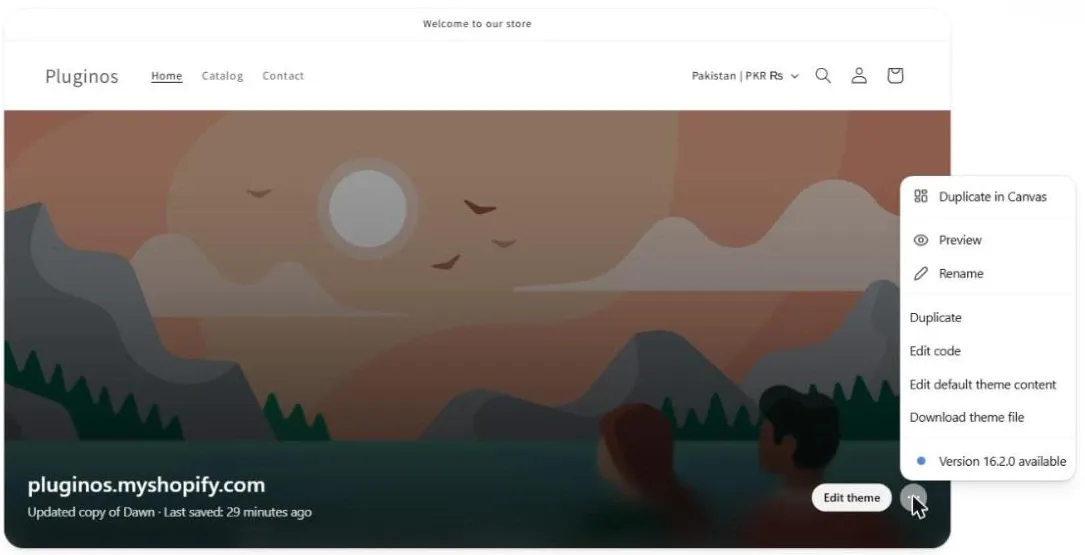
Duplicate your theme. In Shopify admin, go to Online Store → Themes. On your live theme, click ⋯ → Duplicate. If anything breaks, publish the copy.
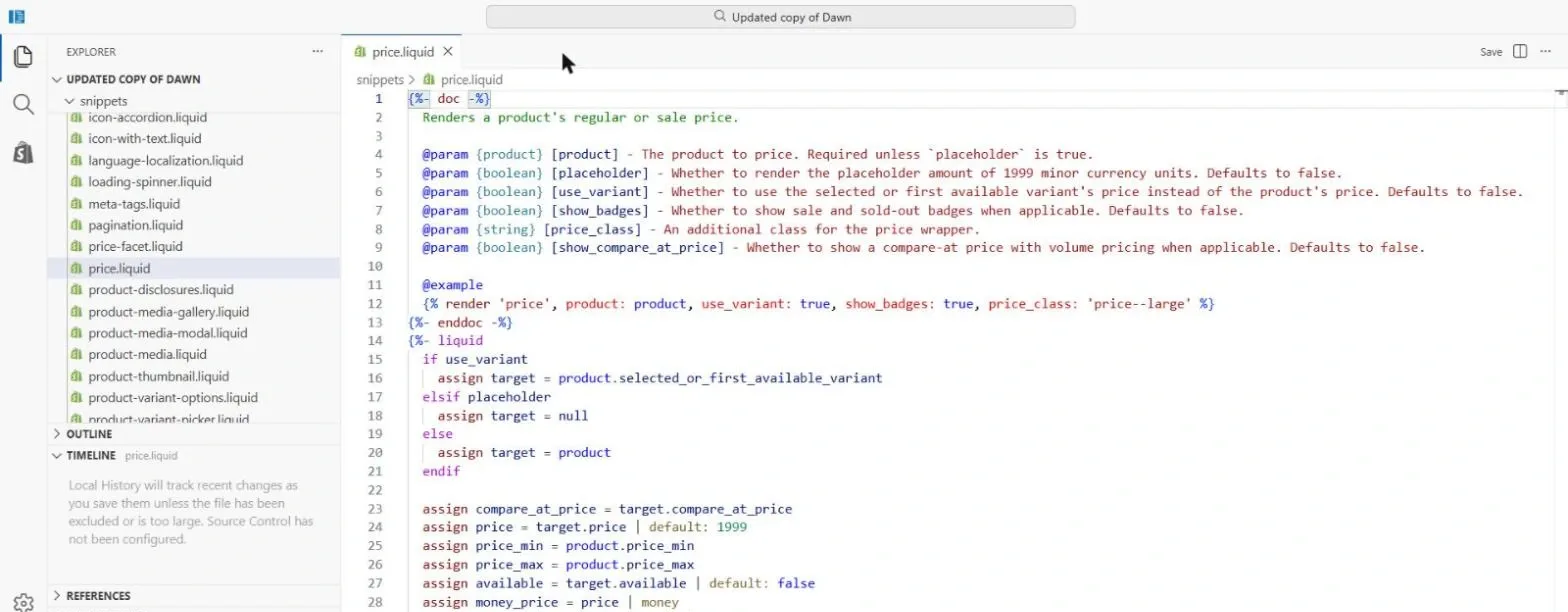
Find the price file. Click ⋯ → Edit code and open
snippets/price.liquid. Dawn uses this file, and Horizon-family themes have one too. If your theme doesn't, use the search box in the code editor to look for| money. The file that prints the price on product cards and product pages is the one you want.Note the variable name. At the top of the snippet, check what the product is called. In Dawn it's
product. Some newer themes pass a different name, so swap it into the code below.
Older guides tell you to edit files like theme.scss.liquid or timber.scss.liquid. Those belong to vintage themes, so you won't find them in Dawn or Horizon.
How to Hide Prices on Shopify With Code (Liquid)
Liquid is Shopify's template language. Wrapping the price snippet in a condition means the price is never printed in that spot for the visitors you choose. That's more reliable than CSS, which only hides a price that's already on the page.
Each example below wraps the whole contents of snippets/price.liquid. Paste the first part at the very top of the file and the second part at the very bottom. Use only one wrapper at a time. To combine rules, join conditions with and / or. Save, then preview the duplicate theme before you publish.
Tested: the Pluginos team tested every snippet in this guide on Shopify's free themes, including Dawn and Horizon, in November 2026. Paid and third-party themes may name files and variables differently.
Hide prices from guests (until they log in)
Top of the file:
{%- if customer -%}
Bottom of the file:
{%- else -%}
  <a href="{{ routes.account_login_url }}" class="price-login">Log in to see price</a>
{%- endif -%}
customer exists only when a shopper is logged in, so guests get a login link instead of the price. For the full login-to-see-price setup, including customer accounts and account approval, see our guide to Shopify login to see price.
Show prices only to wholesale customers
Tag your wholesale customers in Customers (for example, wholesale), then use:
{%- if customer and customer.tags contains 'wholesale' -%}
Bottom of the file:
{%- else -%}
  <span class="price-note">Wholesale pricing: log in with a trade account</span>
{%- endif -%}
If you use Shopify B2B companies instead of tags, Shopify's theme docs use customer.b2b? for the same check: {%- if customer.b2b? -%}.
Hide the price on specific products
Add the tag hide-price to the products you want, then use:
{%- unless product.tags contains 'hide-price' -%}
Bottom of the file:
{%- else -%}
  <span class="price-note">Contact us for price</span>
{%- endunless -%}
This is the cleanest way to hide a product price on Shopify for a handful of made-to-order or quote-only items. A boolean product metafield works the same way: replace the condition with product.metafields.custom.hide_price == true.
Hide prices on collection pages only
Some stores show prices on the product page but not in the grid:
{%- unless template.name == 'collection' -%}
Bottom of the file:
{%- endunless -%}
This hides prices on collection pages only. Product cards on your homepage or in search results still show prices. Add or template.name == 'search' to the condition to cover search too.
Hide the Add to Cart button too
A hidden price with a working Add to Cart button confuses shoppers. In Dawn, the buttons live in snippets/buy-buttons.liquid. Wrap that file the same way:
{%- if customer -%}
  ...existing buy buttons code...
{%- else -%}
  <a href="{{ routes.account_login_url }}" class="button button--full-width">Log in to buy</a>
{%- endif -%}
Also check collection pages. If your theme has a quick add option in the collection or product grid section settings, turn it off. Otherwise guests can still add products from the grid.
Hide the price when it's $0 or sold out
A $0 price usually means "price on request". A sold-out price can invite questions you don't want. Use one of these:
{%- if product.price > 0 -%}
{%- if product.available -%}
Bottom of the file for either:
{%- else -%}
  <span class="price-note">Price on request</span>
{%- endif -%}
To hide sold-out variants rather than their prices, see 6 methods to hide out-of-stock variants in Shopify.
Hide the compare-at price
To keep the sale price but drop the crossed-out original, a CSS rule is usually enough. In Dawn:
.price--on-sale .price-item--regular { display: none; }
Class names vary by theme. Right-click the crossed-out price, choose Inspect, and use the class you see.
How to Hide Prices With CSS (and Why It's Only Cosmetic)
CSS is the fastest fix, but it only hides the price on screen. Go to Online Store → Themes → Customize → Theme settings → Custom CSS, which is Shopify's built-in custom CSS setting, and add:
.price { display: none; }
To hide prices in one section only, such as a featured collection, open that section and use its own Custom CSS box instead.
Know the limits before you rely on it:
CSS can't tell guests from customers. It hides the price for everyone, unless your theme adds a logged-in class to the page.
The price is still in the page source. Anyone who views the source or uses Inspect can read it, and so can Google.
Selectors vary by theme.
.priceworks in Dawn. Other themes may use.product-price,.moneyor something else.
You may also see older advice to edit your store's currency format so prices print inside a hidden <span>. Skip it: it's a store-wide change built for vintage themes, and the price still ends up in the HTML.
How to Hide Prices Using Shopify B2B (No Code, No App)
Shopify B2B is the native way to keep wholesale prices private, and it's now on every main plan. Shopify's help center says B2B features come at no extra cost on Basic, Grow, Advanced and Plus.
How it works:
Create companies for your wholesale buyers. Each buyer logs in with a customer account.
Create a catalog with your wholesale prices and assign it to a B2B market. Company customers see catalog prices when they log in. Everyone else sees your normal prices.
Choose a store type. In a blended store, retail and wholesale share one storefront. A dedicated store is a separate store for B2B only, and Shopify lets you restrict it to logged-in B2B customers (Online store → Preferences → Restrict access to B2B customers only).
Good for | Not built for |
|---|---|
Keeping wholesale prices away from retail shoppers | Hiding all prices from guests on a retail store |
Volume pricing, payment terms, quantity rules | Hiding prices on a few chosen products |
Up to 3 catalogs on Basic/Grow/Advanced (unlimited on Plus) | Retail-only stores with no wholesale buyers |
Two plan limits matter. On Basic, Grow and Advanced, B2B catalogs need your store to use new Shopify Markets. Assigning a catalog directly to one company is Plus-only. To also hide retail prices from guests on a blended store, add the customer.b2b? check from the code section above or use an app.
How to Hide Prices With a Shopify App (No Code)
An app is the easiest way to hide prices on Shopify if you want rules for several audiences, products or countries without editing theme files. Most hide price apps follow the same flow. Here it is with our app, B2B Hide Price & Add to Cart:
Create a rule. Install the app, open it from your Shopify admin and click Create rule. Give the rule a name, such as "Hide wholesale prices from guests".
Select items to hide prices: all products, or only chosen products, collections or variants.
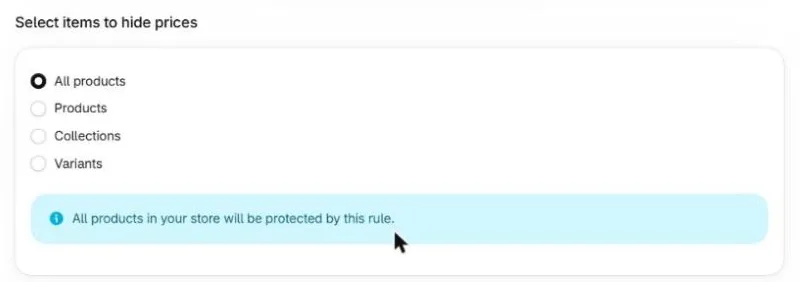
Choose customer targeting: everyone, guests, logged-in customers, customer tags, customer segments, or specific email addresses.
Choose country targeting: all countries, only selected countries, or everywhere except selected countries.
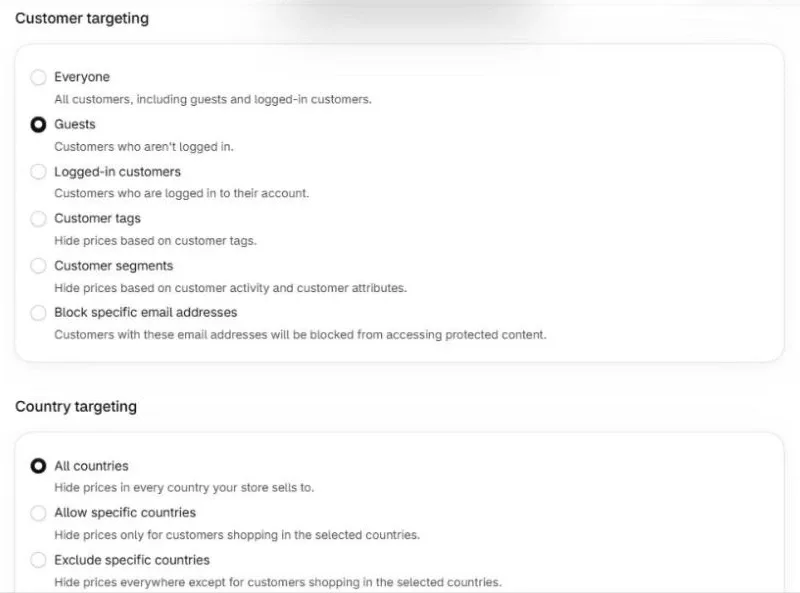
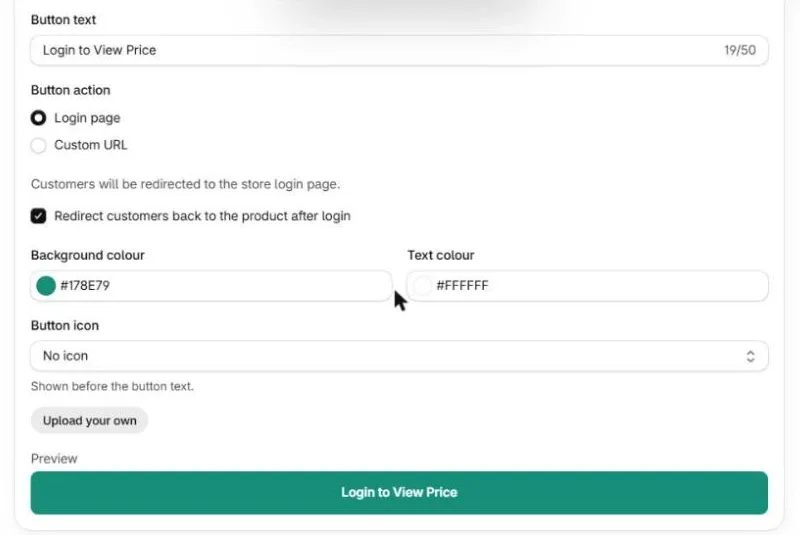
Choose the action: replace the price with custom text and an optional button, with a WhatsApp button, or with a Call for Price button. The custom button can send shoppers to your login page (and back to the product after login) or to any URL, such as a quote form. Check the preview, then click Save to turn the rule on, or Save as draft to finish later.
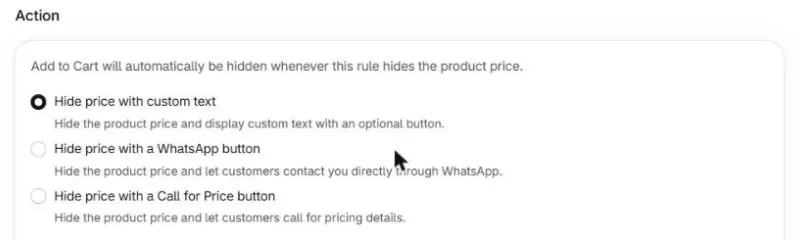
Add to Cart is hidden automatically whenever a rule hides the price, so you don't need a second setting for the button.
On pricing, the App Store listing shows three plans:
Free: build and preview rules; rules go live only after you upgrade.
Founder: $3.99/month for the first 20 stores, with a 90-day trial.
Standard: $4.99/month ($47.90/year) with a 14-day trial. When a rule replaces the Add to Cart button, the app also blocks checkout for that product, so shoppers can't buy it through a direct checkout link either. It hides prices without a price flash and without theme code to edit.
What to look for in any Shopify hide price app
Whichever app you choose, check these before installing:
Targeting: can it hide by product, collection and variant, and by customer tag, not just "logged in or not"?
Add to Cart handling: does it replace the button, and also hide quick add and dynamic checkout buttons (Shop Pay, Apple Pay)?
Checkout enforcement: does it stop purchases that skip your product page, or only hide buttons? See the leak checklist below.
Price flash: does the price appear for a split second before it disappears? That means it's hidden by script after the page loads.
Theme compatibility: does it support Dawn and Horizon-family themes and work as an app embed, or does it inject code you'll have to remove later?
Clean uninstall: does removing the app leave your theme exactly as it was?
Price: is there a free plan, and do rules work on it or only in preview?
For a broader comparison of wholesale tools, see best Shopify wholesale apps.
What to Show Instead of the Price
An empty space where the price was leaves shoppers stuck. Give them a next step that matches how you sell:
Show this | Best for |
|---|---|
"Log in to see price" + login link | Wholesale or members-only stores with existing accounts |
"Request a quote" button / form | Custom, bulk or made-to-order products |
WhatsApp button | Stores that close sales in chat |
"Call for price" | High-ticket items, local or trade buyers |
Short message ("Trade prices for approved accounts. Apply here") | Stores recruiting new wholesale buyers |
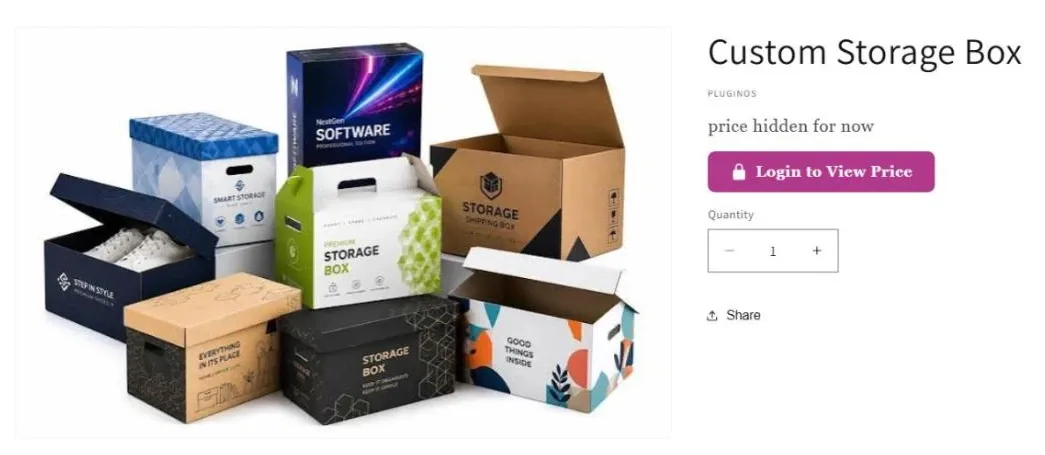
Keep the message short and put it exactly where the price was. To add short text beside prices on products that do show a price, use custom price text.
Is a Hidden Price Actually Private? 5 Places Prices Still Leak
Hiding a price on the page isn't the same as keeping it private. Even when your theme doesn't show it, a product's price can still surface in five places.
Where it leaks | Why | Can you fix it? |
|---|---|---|
1. Page source | CSS hides prices on screen only. Some themes also print variant prices as JSON for the variant picker. | Yes: use Liquid instead of CSS, then search the page source for the price. |
2. Product JSON ( | Shopify's public Ajax Product API returns product data, including prices, for any published product. | Not with theme code. Keep confidential prices in B2B catalogs or quotes, not in the public product price. |
3. Google search results | Shopify's | Yes: wrap the JSON-LD in |
4. Google Merchant Center | Google compares your feed price with the price on the landing page, and a mismatch may get the product disapproved. | Yes: remove hidden-price products from the Google & YouTube sales channel. |
5. Checkout links | Anyone with a variant ID can build a cart permalink that skips your product page. | Yes: require login before checkout, or use an app rule that replaces Add to Cart and blocks checkout for those products. |
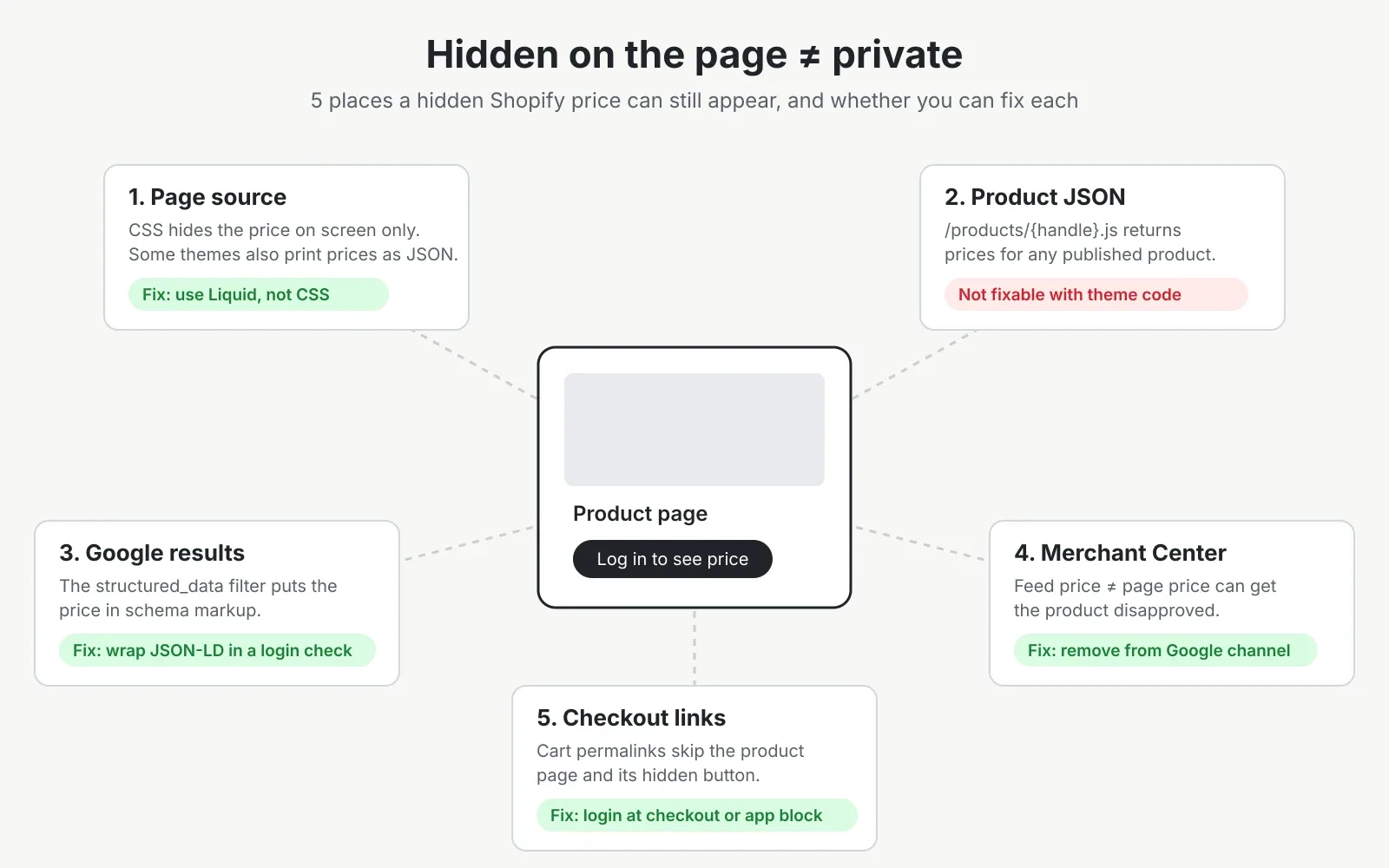
How to apply the fixes:
Structured data: in the code editor, search for
structured_dataorapplication/ld+json. That's usually in the main product section. Wrap that script tag in{%- if customer -%} … {%- endif -%}, so guests and Googlebot don't receive the price markup.Merchant Center: open each hidden-price product, find the sales channels list, and remove Google & YouTube. You can also bulk-edit this from the product list.
Checkout: if all buyers must have an account, go to Settings → Checkout and turn on the option requiring customers to log in before checkout. For product-level rules, you need an app that enforces the rule at checkout, not just in the theme. With B2B Hide Price & Add to Cart, replacing the Add to Cart button also blocks checkout for that product, so purchases through direct checkout links are stopped too.
The product JSON leak is the one most guides miss. If a wholesale price must stay confidential, don't make it the product's public price. Put it in a B2B catalog, or quote it directly.
Hide Prices for Some Countries Only
Distributor agreements, regional pricing or tax display sometimes mean prices should show in one country and stay hidden in another. For example, a brand selling direct in the US might hide prices in the UK, where a distributor sets them.
Theme code can't do this reliably on its own, because Liquid only knows which market a shopper is browsing, and shoppers can switch markets. An app with country rules handles it:
B2B Hide Price & Add to Cart shows or hides prices and Add to Cart by country.
Geo Restrictions restricts whole products or redirects visitors by country.
Different prices instead of hidden ones? See restricting Shopify products by country.
UK stores showing VAT: see tax-included and tax-excluded prices.
Test Your Setup Before Launch
Check every place a shopper or a crawler can meet a price:
Open your store in a private/incognito window (a guest). Check the product page, collection page, search results, homepage product sections and quick add.
Log in as a regular customer, then as a tagged or B2B customer. Confirm each sees what they should.
Try to buy as a guest: add to cart, open the cart and start checkout. Then open a checkout link for a hidden product (Products → product → More actions → Create checkout link) and confirm checkout is blocked for any product whose Add to Cart button you replaced.
View the page source and press Ctrl+F (Cmd+F on Mac) for the price.
Visit
yourstore.com/products/your-product-handle.jsand note what's exposed.Run the product URL through Google's Rich Results Test to see what price markup Google receives.
Check Merchant Center → Products a few days later for price-mismatch warnings.
If checkout or Add to Cart misbehaves after your changes, our Add to Cart troubleshooting guide covers the usual causes.
Frequently Asked Questions
Is there a free way to hide prices on Shopify? Yes. Liquid code, CSS and Shopify B2B are all free on standard plans. Liquid is the most reliable free option for hiding prices from guests or on chosen products. Apps cost a monthly fee, though some offer free plans.
Do I need Shopify Plus to hide prices? No. Theme code, CSS and apps work on any plan. Since April 2026, Shopify B2B (companies, catalogs, volume pricing) is also on Basic, Grow and Advanced. Plus adds extras such as unlimited catalogs and catalogs assigned directly to single companies.
Does hiding prices hurt my Shopify SEO? Hiding the price alone doesn't remove your pages from Google, as long as descriptions and images stay visible. You lose price details in search results if you remove the price markup. Putting the whole store behind a password stops search engines from indexing it.
Can customers still add a product to the cart if the price is hidden? Yes, unless you hide the Add to Cart button too. The price then appears in the cart and at checkout. Hide the button, quick add and dynamic checkout buttons together. To stop purchases entirely, block checkout as described in the leak checklist.
Can I hide prices on Shopify for a limited time? Yes. With code, remove the wrapper when you're done. Keeping the duplicate theme makes this a one-click switch. With an app, turn the rule off. Check whether the app can schedule rules if you need prices to reappear at a set time.
Will hiding prices remove my products from Google Shopping? It can. Google compares your feed price with the landing page, and products with a mismatch may be disapproved. Take hidden-price products out of the Google & YouTube sales channel to avoid account warnings.
Pick Your Method and Set It Up
One or two simple rules (guests, a few products, collection pages): use the Liquid snippets above. They're free, and the price isn't printed for the visitors you exclude.
Wholesale pricing for approved companies: use Shopify B2B catalogs, now on every main plan, and add the
customer.b2b?check if guests shouldn't see retail prices either.Several audiences, countries or a checkout block without touching code: use an app. B2B Hide Price & Add to Cart lets you build and preview rules on the free plan before you pay.
Whichever you choose, run the test checklist before launch. That's how you'll know the price is hidden everywhere it needs to be.
Written by
Pluginos
Pluginos is a WordPress, WooCommerce, and Shopify development team with 8+ years of experience building plugins, apps, and eCommerce solutions. We share practical tutorials and insights based on hands-on development experience.
Related articles
10 Best Email Marketing Apps for Shopify in 2026 (Compared)
From welcome flows to abandoned cart emails, the right email app depends on your list size and budget. We compared 10 Shopify email marketing apps, starting with Kaching Email Marketing, on pricing, automations and limits. We also explain when Shopify's built-in Messaging, with 10,000 free emails a
Nov 22, 2026 · 16 min read
10 Best Shopify Popup Apps in 2026: Pricing & Features
Popups can grow your email list or raise order value, but the wrong one slows your store or annoys shoppers. We compared 10 Shopify popup apps, led by Kaching Discount Upsell Popup, on pricing, popup types and drawbacks. We also explain how to stay within Google's guidance on intrusive popups.
Nov 22, 2026 · 17 min read
10 Best Post-Purchase Upsell Apps for Shopify in 2026
Post-purchase upsells show a one-click offer after checkout, before the Thank You page, so customers don't have to re-enter their card. We compared 10 Shopify apps, led by Kaching Post Purchase Upsell, on pricing and features.
Nov 22, 2026 · 16 min read