
Best Shopify App for Halloween Sales in 2026: 14 Apps Compared
Find the best Shopify app for Halloween sales with this practical comparison of 14 tools. Explore bundles, countdown timers, restock alerts, email campaigns, and seasonal effects, with pricing, plan limits, and tips to help you choose the right apps for your store.

Oct 13, 2026 · 17 min read
A customer finds the perfect Halloween costume in your store. Then their size is unavailable, the discount is unclear, or they cannot tell whether it will arrive before the party.
Choose an app that addresses the obstacle between finding a product and completing the purchase.
For a store planning bundles or quantity offers, Bundler is a practical starting point. For a timed sale, consider Essential Countdown Timer Bar. To explain an offer beside product prices, consider Pluginos Custom Price Text. Stores with limited inventory may need restock alerts, variant controls, or cart reservations instead.
This guide compares 14 options by sales goal, with Halloween examples, pricing limits, and checks to complete before launch. The numbered list is not a ranking.
Updated October 13, 2026. Features and prices were checked against official app listings and developer documentation. Prices are in USD. Confirm billing terms and applicable taxes before subscribing.
How these apps were selected
The shortlist covers offer visibility, inventory, bundles, customer messaging, delivery information, reviews, and seasonal styling. Recommendations consider the listed features, Halloween use cases, entry cost, and plan limits. Four Pluginos tools are included for their specific price-display and inventory functions. This is a research-based comparison, not a hands-on performance test; no sales increase or compatibility between apps is guaranteed.
Compare the best Shopify apps for Halloween sales
Use this table to shortlist tools for your campaign. The detailed sections explain plan limits and setup considerations.
App | Recommended use | Entry pricing or free option |
|---|---|---|
Pluginos Custom Price Text | Offer messages beside prices | From $1.99/month |
Pluginos Back in Stock–Restock Alert | Capture demand for sold-out products | Free; Starter $4.99/month |
HV Hide Out of Stock Variants | Manage unavailable sizes and colors | Free for up to 2 products; Standard $4.34/month |
Pluginos Reserve Items in Cart | Timed holds for limited stock | From $9.99/month |
Essential Countdown Timer Bar | Sale deadline countdowns | Free; Starter $6.99/month |
Bundler | Bundles and quantity offers | Free; Premium $9.99/month |
Selleasy | Relevant product add-ons | Free tier; paid pricing differs across official sources—see section 7 |
Klaviyo | Segmented email and SMS campaigns | Free for up to 250 active profiles and 500 monthly email sends; paid email listed from $20/month |
Omnisend | Email, forms, and cart recovery | Free; Standard from $16/month |
Privy | Targeted popups and list growth | Popups from $24/month |
Loox | Visual customer reviews | Beginner free until 500 total orders after the trial; Convert from $49.99/month |
Estimated Delivery Date–ETA | Delivery estimates and order cutoffs | Free; Startup $6.99/month |
Halloween Day Celebration | Simple Halloween decorations | Free |
MIT Festival Effects & Decor | Targeted and scheduled seasonal effects | Limited free plan; Premium $1.49/month |
Prices and capabilities come from the official sources linked below. Compare the feature and usage allowance you need, not just whether a free plan is available.
1. Pluginos Custom Price Text for clearer Halloween offers
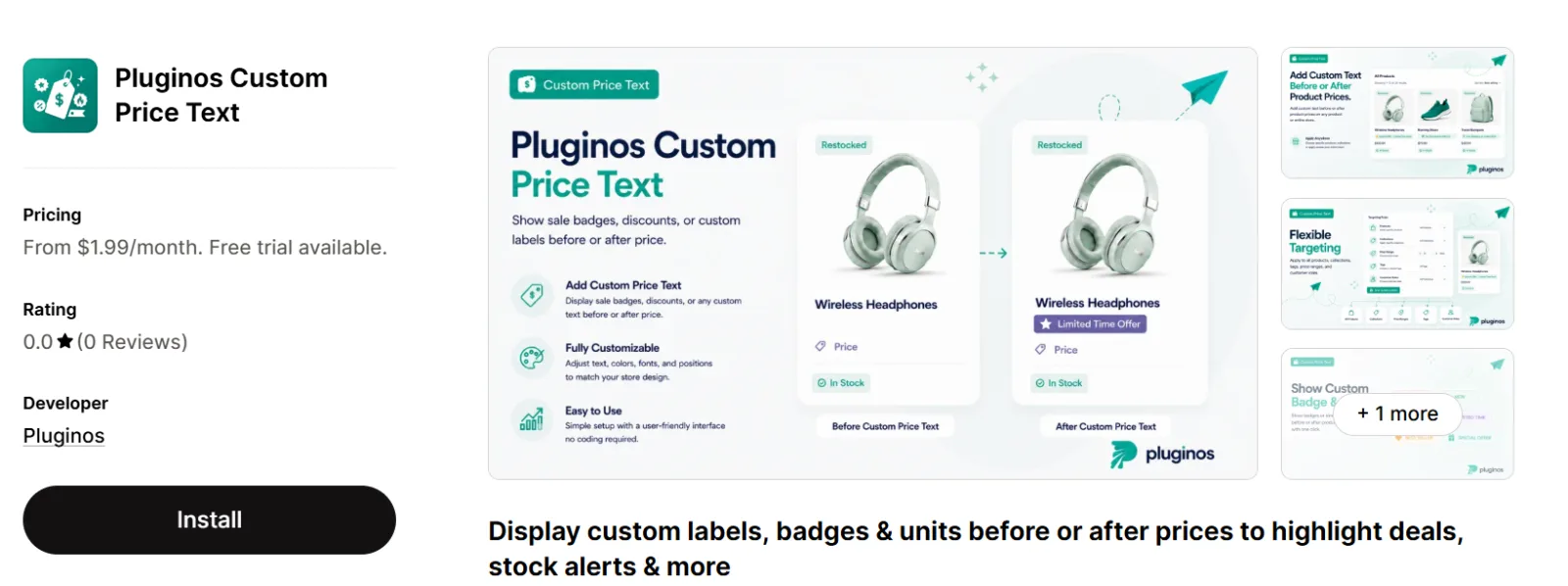
Pluginos Custom Price Text adds text or badges before or after prices on product and collection pages. It supports targeting and scheduled labels.
Halloween example: Put “Halloween offer · ends Oct 28” beside eligible prices, or use “Per pack of 12” to clarify party-supply quantities.
Start by tagging eligible products, choosing one short message, and matching its display period to your offer.
Pricing: Standard is $1.99/month; Pro is $2.99/month. A seven-day trial is listed.
Know the limit: This is a messaging tool. Create the actual price reduction or discount separately, then confirm the label matches what shoppers pay. Do not describe a discount as already included if it only applies later in checkout.
Source: Official app listing.
2. Pluginos Back in Stock Alert for recovering sold-out demand
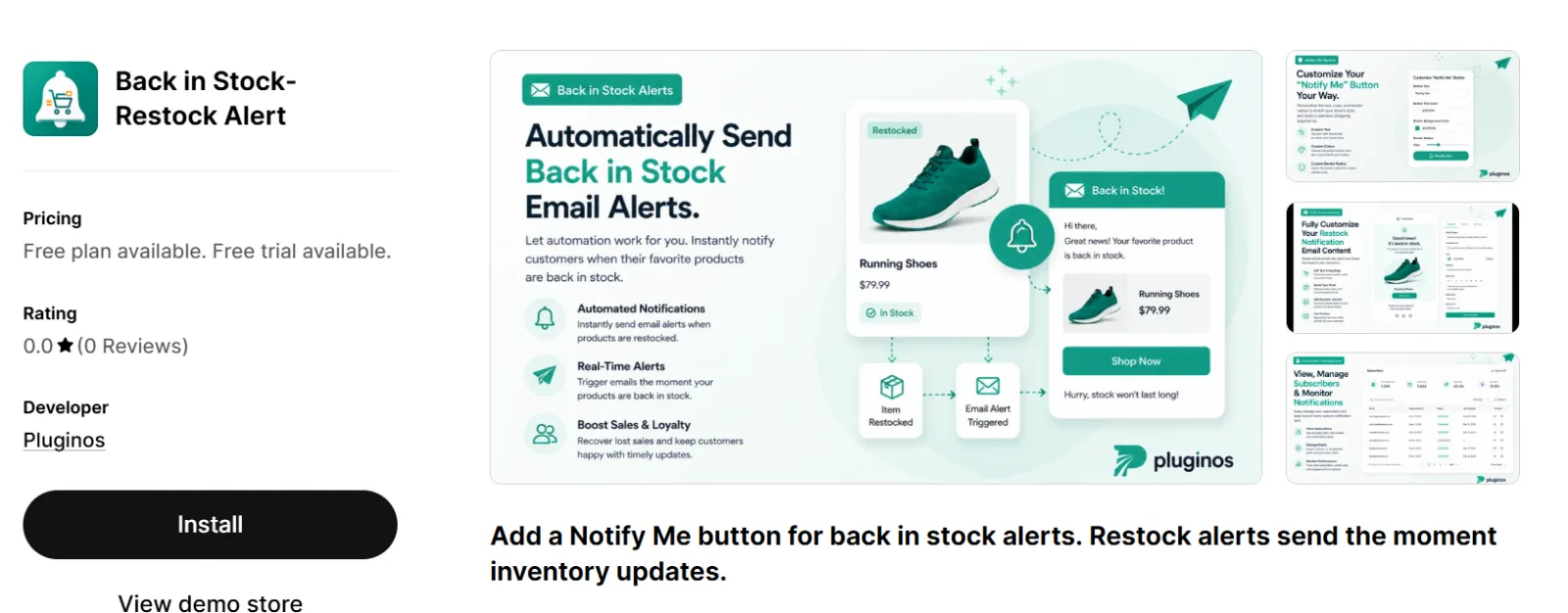
Pluginos Back in Stock Alert provides a customizable Notify Me button, subscriptions for specific variants, and automatic restock emails.
Halloween example: A shopper wants a sold-out medium costume. Let them request an alert for that size instead of receiving an unrelated product message.
Pricing: The free plan lists one active notification rule and 25 restock emails every 30 days. Starter is $4.99/month for 100 emails per billing period; Pro is $15.99/month with unlimited restock emails.
Know the limit: Use Halloween messaging only when the replenished item can still reach customers in time. A restock email is not a delivery guarantee.
Avoid automatically treating a restock request as consent to every future marketing campaign.
Source: Official app listing.
3. HV Hide Out of Stock Variants for unavailable sizes and colors
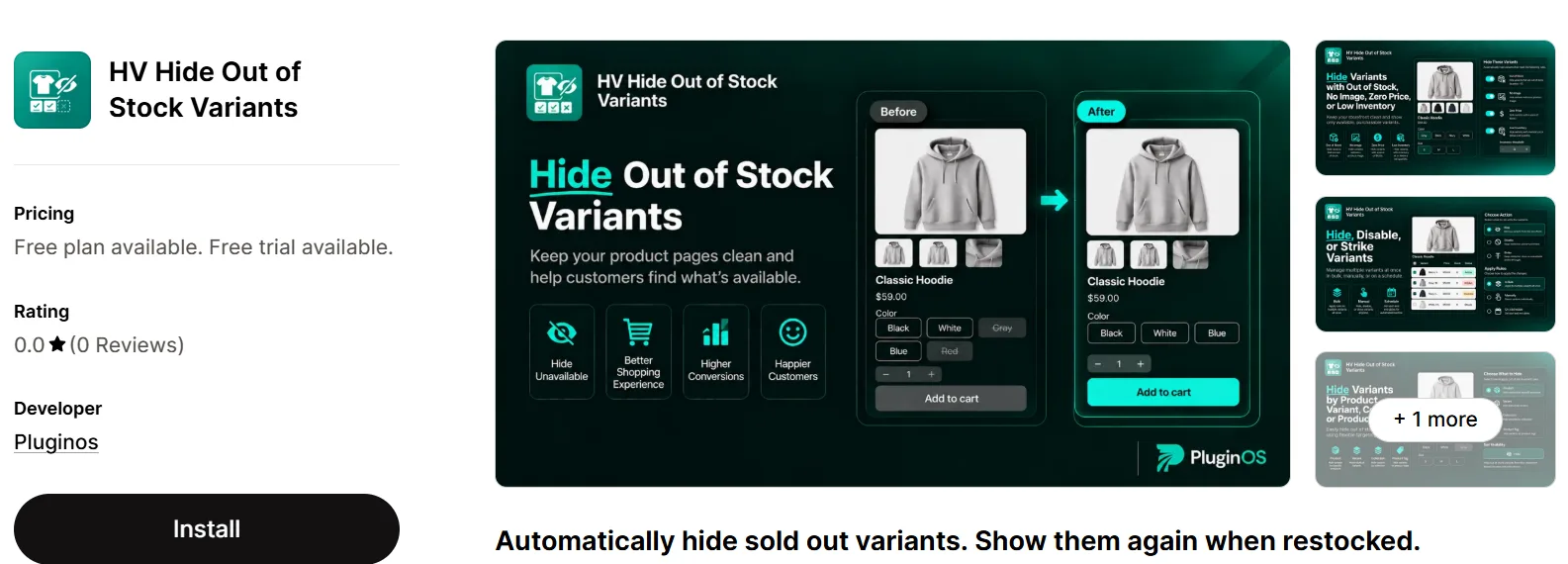
HV Hide Out of Stock Variants can hide, disable, or strike through unavailable options and restore them after restocking. Rules can target products, collections, and countries.
Halloween example: Hide permanently unavailable costume sizes while keeping purchasable sizes easy to find.
Pricing: Free covers up to two products. Standard is listed at $4.34/month with no product limit.
Know the limit: Hiding a variant can also remove the shopper’s route to its restock signup. For items returning soon, consider leaving the option visible but unavailable and test whether its Notify Me button remains accessible.
Source: Official app listing.
4. Pluginos Reserve Items in Cart for limited releases
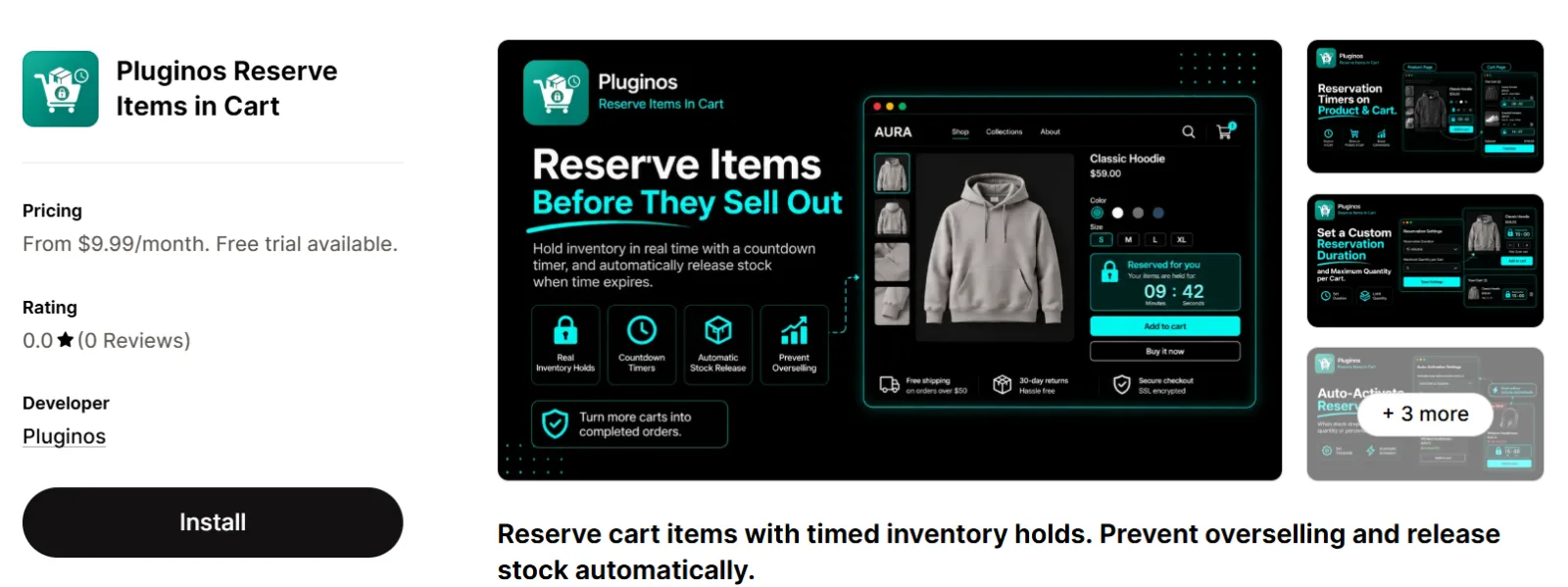
Pluginos Reserve Items in Cart temporarily holds eligible inventory, displays reservation timers, and releases expired holds. The developer also describes controls for duration and reservation quantities.
Halloween example: Give shoppers a defined checkout window for a small batch of handmade masks. Choose a hold long enough for the checkout process, then adjust it using completed and expired reservation data.
Pricing: Starter is $9.99/month for 300 reservations per billing period and up to five rules. Pro is $19.99/month with unlimited reservations and rules; stock-threshold rules are listed on Pro.
Know the limit: A sale countdown communicates a deadline; this app is intended to hold stock. Test competing carts, expiration, quantity changes, and checkout before launch. Long holds can leave stock tied up in abandoned carts.
Sources: Official app listing.
5. Essential Countdown Timer Bar for real sale deadlines

Essential Countdown Timer Bar supports product timers and announcement bars, with more placements and timing features on paid plans.
Halloween example: Display “Halloween bundle offer ends Sunday” above the collection, using the same deadline as the discount.
Pricing: Free includes up to 1,000 monthly timer views. Starter is $6.99/month for up to 10,000 views and lists scheduled timers. Essential is $9.99/month and adds cart and email timers.
Know the limit: Timer views are not orders. Estimate campaign traffic before choosing a plan.
Keep the expiry meaningful. If the advertised offer continues after the timer reaches zero, update the message rather than restarting a misleading countdown.
Source: Official app listing.
6. Bundler for Halloween bundles and quantity offers

Bundler supports bundle offers, quantity breaks, and volume discounts.
Halloween example: Offer a costume with matching accessories, or create a movie-night pack from a blanket, candle, and snack bowl.
Choose products customers would reasonably use together. Calculate the bundle margin before setting a saving.
Pricing: The free plan lists volume discounts, quantity breaks, and Buy X Get Y offers. Premium is $9.99/month and adds mix-and-match features and custom landing pages. Executive is $19.99/month and adds bundle analytics.
Know the limit: A build-your-own party pack may require paid functionality even when a simpler offer works on Free. Test inventory behavior, product variants, and interactions with existing discounts.
Source: Official app listing.
7. Selleasy for helpful product add-ons
Selleasy provides frequently-bought-together offers and product add-ons across supported storefront and purchase placements.
Halloween example: Suggest face paint with a costume or batteries with an illuminated decoration. Recommend something that helps the customer use the main purchase.
Pricing: Official sources differ. Logbase’s pricing page lists Free for 0–50 total monthly orders and paid Starter tiers of $9, $19, and $29. The Shopify listing reviewed for the original draft showed a $15 Starter plan. Both list Pro at $49/month. Check the subscription terms offered to your store before budgeting.
Know the limit: Eligibility is based on total store orders, not just orders generated by upsells. Confirm the exact free-tier boundary and billing model for the plan you accept.
The listing places Shopify Plus checkout upsells on Pro. Confirm your plan and placement support before building an offer around checkout. Product-page or cart suggestions may be the more suitable starting point.
Sources: Logbase pricing.
8. Klaviyo for segmented Halloween messaging

Klaviyo combines Shopify data with segmentation, personalized campaigns, and automated messaging.
Halloween example: Send relevant decoration offers to previous home-decor buyers and costume offers to customers who bought related items. Exclude recent purchasers from reminders to buy the same product.
Pricing: Klaviyo’s pricing page lists Free for up to 250 active profiles and 500 monthly email sends, plus $5 of mobile messages per month, subject to region and carrier. The Shopify listing shows paid email from $20/month for 251–500 contacts and SMS from $15/month.
Know the limit: Check sending allowances as well as contact counts. SMS costs and availability depend on your messaging setup and destinations.
If your existing email platform already handles your campaign, improving its segments may be more useful than switching tools in October.
Sources: Shopify app listing and Klaviyo pricing.
9. Omnisend for email campaigns and cart recovery

Omnisend includes email campaigns, signup forms, popups, and automated welcome and abandoned-cart workflows.
Halloween example: Run an early-access email, a main offer, and a final reminder before your delivery cutoff. Suppress customers who already purchased.
Pricing: Free reaches up to 250 people with 500 emails per month. Standard starts at $16/month for up to 500 contacts and 6,000 emails.
Know the limit: Sending three campaigns to 250 contacts uses 750 emails before automations, exceeding the free allowance.
Choose between Omnisend and Klaviyo based on your workflow. Running parallel cart-recovery sequences can create duplicate messages and confusing offers.
Source: Official app listing.
10. Privy for targeted Halloween popups

Privy offers popup targeting, list-growth tools, and email and SMS products.
Halloween example: Invite new visitors to get early access to a limited collection. Use a different message for subscribers who already joined.
Pricing: Pop Ups & Displays starts at $24/month for up to 10,000 monthly pageviews. Email starts at $30/month; Email and SMS starts at $45/month.
Know the limit: Plan costs depend on traffic, contacts, and the services you use.
Make the popup easy to dismiss on mobile. Measure resulting purchases and margin alongside signups. A large subscriber list is less useful if the offer attracts people who never purchase.
Source: Official app listing.
11. Loox for visual product reviews

Loox collects and displays visual customer reviews.
Halloween example: Feature genuine customer photos showing costume fit or the scale of a decoration. These help answer questions polished product photography may leave open.
Pricing: Beginner is free until your store reaches 500 total orders after the Loox trial ends. This is a cumulative allowance, not 500 orders each month. Convert is listed at $49.99/month with 300 orders included and an additional $50 per extra 300 orders.
Know the limit: An established store can exhaust the free allowance quickly. Review the billing period and volume charges for your paid plan. Video reviews are listed on Convert.
A newly launched Halloween item may have no customer reviews yet. Use accurate product measurements and photos while you collect authentic feedback.
Sources: Shopify app listing.
12. Estimated Delivery Date–ETA for deadline-sensitive purchases

Estimated Delivery Date–ETA displays delivery estimates using processing time, transit time, holidays, and cutoff rules.
Halloween example: Show whether a costume’s expected delivery window falls before the customer’s event.
Pricing: Lite is free with up to 100 ETA views. Startup is $6.99/month and lists unlimited ETA views. More advanced rules appear on higher plans.
Know the limit: Your estimate is only as useful as the information you configure. Include production time for personalized products and realistic carrier buffers.
Review restrictions for checkout placements; certain checkout ETA features are identified for Shopify Plus. Describe delivery as estimated unless you can support a guarantee.
Source: Official app listing.
13. Halloween Day Celebration for simple decorations

Halloween Day Celebration adds Halloween visuals, including a flying skeleton and custom greeting images, with options for where decorations appear.
Halloween example: Apply a restrained effect to the homepage while keeping product selection and navigation clear.
Pricing: Free.
Know the limit: Decorations provide seasonal atmosphere. They do not replace discount setup, useful product information, or delivery guidance.
Check the actual storefront on mobile. Make sure effects do not obscure buttons, product details, or the cart. Keep them only if they improve the shopping experience.
Source: Official app listing.
14. MIT Festival Effects & Decor for controlled seasonal styling

MIT Festival Effects & Decor lists seasonal effects, decorations, and cursors, with scheduling and controls for pages, countries, and devices.
Halloween example: Apply a pumpkin effect to a Halloween collection while keeping other pages visually simpler.
Pricing: Free is limited to one snowfall effect displayed on all pages. Premium is $1.49/month.
Know the limit: A free plan is available, but that does not establish that your chosen Halloween effect is free. Check the required effect and targeting controls before installing.
Choose one decoration app, preview it on your theme, and plan when to switch it off.
Source: Official app listing.
Choose a small setup that fits your store
Start with the problem most likely to cost you an order, then choose the smallest setup that addresses it.
Store situation | Suggested starting combination | What to check first |
|---|---|---|
Small store running a simple sale | Native Shopify discount + Custom Price Text + existing email tool | Does the displayed message match checkout? |
Costume store with many variants | HV variant controls + Back in Stock Alert | Can shoppers request alerts for returning sizes? |
Handmade or limited-release store | Reserve Items in Cart + delivery guidance | Do holds expire and stock return correctly? |
Store selling complementary products | Bundler or Selleasy + existing email tool | Does the offer preserve margin? |
Store needing seasonal styling | One decoration app + clear offer message | Are mobile controls easy to use? |
For example, Custom Price Text Standard and Essential Countdown Starter total $8.98 per 30-day billing cycle, before applicable taxes, at the listed prices. That pays for offer messaging and a scheduled countdown; it does not include an email subscription or apply the discount itself.
There is no need to install both Bundler and Selleasy for the same simple offer, or several popup tools that interrupt the same shopper.
The four Pluginos listings reviewed here showed no merchant reviews at the time checked. Their inclusion reflects listed functionality, not established merchant feedback. Evaluate them against your Shopify theme and campaign requirements during the available trial or free plan.
Check Shopify’s built-in features before paying for another app
Shopify supports native amount-off, free-shipping, and Buy X Get Y automatic discounts. For a straightforward Halloween offer, those may cover the discount itself.
An app becomes useful when you need something more specific, such as configurable bundles, stock reservations, targeted labels, or restock subscriptions.
For native Buy X Get Y promotions, customers need the qualifying and reward items in their carts. Do not assume the free item appears automatically.
Source: Shopify documentation.
Plan around delivery as well as October 31
A Halloween costume sale and a skincare promotion can follow different calendars. Customers need the costume for an event; the skincare order may remain useful afterward.
Work backward from when the customer needs the product:
Latest sensible order date = required arrival date − processing time − transit time − delivery buffer.
Use the actual shipping service, destination, working days, and stock status. Personalized products need their production time included.
For example, if a customer needs an order by October 30 and the complete lead time, including a buffer, is seven calendar days, the latest order date is October 23. Recalculate when processing or transit times use business days, and state the cutoff time and timezone. A countdown cannot make an unrealistic delivery window achievable.
Campaign stage | Practical action |
|---|---|
Before launch | Pick the offer, confirm stock, calculate margin, and configure delivery estimates |
Early campaign | Promote products with sufficient delivery time; capture relevant restock requests |
Before the shipping cutoff | Send a reminder using accurate destination and service information |
After the cutoff | Promote verified local pickup, suitable digital products, or products useful after Halloween |
After the offer ends | Stop expired discounts, labels, timers, popups, and seasonal email messages |
Avoid sending a “Get your Halloween costume now” restock email after the delivery window has passed. Change the message or recommend a suitable alternative.
Test the whole purchase journey
Before sending traffic, make a test purchase from the same pages shoppers will visit.
Check mobile display. Confirm prices, labels, variant selectors, popups, and buttons remain readable.
Try available and unavailable variants. Check that shoppers can buy what is in stock and request an alert where appropriate.
Test competing cart reservations. Use separate sessions and confirm expiration, stock release, quantity changes, and any accelerated checkout paths you offer. If you also use stock alerts, check whether releasing a hold can trigger an unintended restock email.
Check discounts together. Try the bundle, subscriber coupon, and free-shipping offer in one cart.
Review delivery estimates. Include destinations and products with different processing times.
Check campaign endings. Confirm the discount, label, and timer stop at matching times.
Review page performance. Compare the same pages and devices before and after adding scripts or effects.
Shopify discount combinations depend on discount classes, settings, and eligibility. Advertising two offers together does not establish that they can both apply to the same purchase.
Source: Shopify documentation.
Measure profit alongside Halloween sales
Choose one main outcome for each app:
Tool type | Useful measure |
|---|---|
Offer labels or timers | Completed purchases relative to comparable eligible visits |
Bundles or add-ons | Contribution per order and average order value |
Restock alerts | Orders following alerts and remaining stock |
Cart reservations | Converted holds, expired holds, and time inventory stays unavailable |
Email or popups | Purchases, campaign cost, and unsubscribe rate |
Decorations | Product engagement, purchasing behavior, and page performance |
Average order value is revenue divided by orders. It can rise while profit falls if the offer is too generous.
Consider this illustrative bundle:
Normal combined price: $40
Halloween bundle price: $34
Product cost: $18
Variable fulfillment and payment costs: $4
The offer leaves $12 per order before advertising, app fees, returns, and other costs: $34 − $18 − $4. This is a contribution toward those remaining costs, not net profit. Use it when deciding what you can spend to attract the sale.
As a separate, simplified break-even example, a $20 app needs five additional orders contributing $4 each after their variable costs to cover its fee. An app dashboard’s attributed revenue does not prove those purchases were additional. Compare similar traffic and offers, or run a suitable controlled test.
Frequently asked questions
What is the best Shopify app for Halloween sales?
For a product-based Halloween offer, Bundler is a practical starting point. Essential Countdown suits a real promotion deadline, while Pluginos Custom Price Text helps explain offers beside prices. Inventory-focused stores may get more value from variant management, restock alerts, or cart reservations.
Are free Shopify Halloween apps enough?
They can be. Match the free allowance to your campaign: timer views, email sends, supported products, or total orders. Native Shopify discounts may also cover the offer without another subscription.
Can I use restock alerts and hide sold-out variants together?
Potentially, but test the experience. A hidden variant may no longer be selectable for a restock request. Keep returning products discoverable and use hiding rules for options you do not expect to replenish in time.
Does a countdown timer reserve inventory?
A countdown display alone does not reserve stock. Choose a reservation tool when you need actual timed stock holds and verify its behavior before a busy launch.
Can these apps help if I do not sell Halloween products?
Yes. You can create a relevant seasonal offer using your normal catalog: a movie-night bundle, autumn beauty set, or limited promotional collection. Keep the offer useful to your audience.
When should I remove Halloween effects?
Schedule removal after your campaign ends, unless the design still serves a clear purpose. Check banners, product labels, timers, popups, and automated messages as well as decorations.
The best Shopify apps for Halloween sales are the one that helps customers complete a useful purchase. Start with a clear offer, available products, accurate delivery information, and one tool that addresses your biggest obstacle. Add more only when you can explain what each one contributes.
Written by
Pluginos
Pluginos is a WordPress, WooCommerce, and Shopify development team with 8+ years of experience building plugins, apps, and eCommerce solutions. We share practical tutorials and insights based on hands-on development experience.
Tools from this article
 Shopify
Pluginos Custom Price Text
Show a sale badge, stock warning, bulk deal note or any short message next to your prices, on one product or the whole store.
 Shopify
Back in Stock - Restock Alert
Notify customers the moment products are back in stock and turn sold-out pages into sales.
 Shopify
HV Hide Out of Stock Variant
Automatically hide out-of-stock variants on Shopify and show them again when restocked. Choose to hide or strike through unavailable options. Control variant visibility with rules based on stock level, missing images, zero prices, products, collections, tags, countries, or schedules.
 Shopify
Pluginos Order Quantity Limits
Set min and max order quantity limits and target them by customer group or country.
 Shopify
Pluginos Reserve Items in Cart
Give shoppers a clear window to purchase limited-stock items. Pluginos Reserve Items in Cart is a Shopify cart reservation app that temporarily holds inventory, shows reservation countdowns, and automatically releases stock when time runs out.
Related articles
How to Show Tax-Included and Tax-Excluded Prices in Shopify
Help retail and business customers understand your pricing. Learn how to display VAT-inclusive and VAT-exclusive prices on Shopify product and collection pages with the Pluginos VAT Dual Prices app.
Oct 13, 2026 · 15 min read
Best Shopify Wholesale Apps: Which One Fits Your B2B Store?
Compare the best Shopify wholesale apps for pricing, bulk ordering, buyer access, and payment terms. Explore features, costs, and plan limits to find the right solution
Oct 11, 2026 · 23 min read
15+ Best Shopify Upsell Apps: Pricing & Features Compared
Choosing a Shopify upsell app starts with understanding your store’s needs. Compare 15 options by features, pricing, offer placement, and limitations, then use practical checklists to shortlist and test a suitable app.
Oct 10, 2026 · 22 min read