
15+ Best Shopify Upsell Apps: Pricing & Features Compared
Choosing a Shopify upsell app starts with understanding your store’s needs. Compare 15 options by features, pricing, offer placement, and limitations, then use practical checklists to shortlist and test a suitable app.

Oct 10, 2026 · 22 min read
Choosing between Shopify upsell apps is difficult because similar promises can hide very different products. A recommendation widget, a bundle builder, and a post-purchase funnel each solve a different problem. Their prices may also depend on orders, offer views, or revenue attributed to the app.
For an affordable starting point, compare Selleasy and Essential. For product bundles, shortlist Fast Bundle and Frequently Bought Together CBB. For post-purchase funnels and testing, evaluate AfterSell and Zipify OCU.
The best upsell app for Shopify is the one that supports your intended offer, works with your store, and delivers enough value after costs. This guide compares 15 options, explains their limitations, and provides a practical way to shortlist and test them.
Which Shopify upsell app fits your store?
Choose the selling experience first, then compare suitable apps.
Your requirement | Apps to shortlist | Important condition |
|---|---|---|
Affordable product add-ons and recommendations | Selleasy, Essential | Check order or generated-revenue allowances |
Frequently bought together offers | Frequently Bought Together CBB, Selleasy | Check automated versus manual recommendation access |
Mix-and-match or customer-built bundles | Fast Bundle | Budget using bundle-sales revenue |
Gifts and qualifying-purchase incentives | BOGOS | Check Shopify-plan eligibility and usage charges |
A replacement cart drawer | UpCart, iCart | Avoid conflicting with an existing cart tool |
Post-purchase funnels and testing | AfterSell, Zipify OCU | Check payment eligibility and the applicable pricing tier |
Checkout-step offers on Shopify Plus | Selleasy Pro, AfterSell, Zipify OCU | Shopify Plus alone does not establish app-plan access |
Personalization across several store functions | Rebuy | Price the required packages together |
These are editorial shortlists based on documented capabilities and pricing. They are not results from a controlled comparison of sales performance.
How the apps were evaluated
This comparison is based on official app listings, developer pricing pages, and Shopify documentation checked on 2026. It does not claim hands-on testing of all 15 apps or independently measured revenue uplift.
The selection criteria are:
Offer types and placements.
Shopify-plan and app-plan eligibility.
Pricing basis and free-access conditions.
Relevant integrations, customization, and measurement.
Limitations that could change a merchant’s decision.
All prices are in USD. Monthly figures exclude annual discounts, taxes, and separately charged integrations. Where official sources leave a term unclear or disagree, that uncertainty is stated.
Shopify upsell apps compared at a glance
An advertised entry price is not necessarily the price of the feature you need.
App | Main use case | Advertised paid entry | Main cost or eligibility consideration |
|---|---|---|---|
Selleasy | Recommendations across several placements | $9/month | Starter follows orders; checkout requires Pro |
Essential | Product-page and post-purchase offers | $9.99/month | Generated-revenue allowances; cart offers from $19.99 |
ReConvert / Upsell.com | Connected offers and funnels | $9.99/month in app listing | Order/revenue billing; confirm conflicting details |
AfterSell | Post-purchase offers and testing | From $34.99/month | Package and monthly order volume |
Zipify OCU | Structured upsell funnels | $9.95/month | Monthly upsell revenue |
Rebuy | Broader personalization | From $25/month | Packages and monthly orders |
Frequently Bought Together CBB | Complementary-product combinations | $14.99/month | Order-based paid tiers |
Fast Bundle | Bundles and quantity offers | $19/month | Monthly bundle sales |
BOGOS | Gifts, BOGO, and bundles | $29.99/month | Shopify plan and counted BOGOS orders |
Candy Rack | Offers and a cart drawer | $29.99/month | Online-store orders |
Bold | Upgrade offers and funnels | $4.99/month | Shopify-plan-based pricing |
iCart | Cart incentives and customization | $9/month | Order tiers; initial lifetime allowance |
UpCart | Cart drawer and add-ons | $29.99/month | Monthly store orders |
Honeycomb | Offer funnels and split tests | $54.99/month | Monthly funnel views |
SellUp | Accessories and contextual add-ons | $14.99/month | Monthly upsell views |
The reviews below link to the official listings and explain the relevant conditions.
The 15 Shopify upsell apps to consider
1. Selleasy: best for an affordable start across several placements

Selleasy, developed by Logbase, supports complementary-product recommendations throughout the shopping journey.
An apparel merchant could start with matching accessories and expand into cart offers after confirming the first campaign works. For broader store requirements, see our guide to Shopify apps for small clothing stores.
Key features
Frequently bought together combinations and product add-ons.
List, grid, carousel, and popup offer layouts.
Cart offers and eligible post-purchase offers.
Thank-you and order-status recommendations.
Checkout upsells on Pro for Shopify Plus.
Higher-plan targeting and AI functionality.
Pricing
Plan | Monthly price | Main condition |
|---|---|---|
Starter I | Free | Up to 50 store orders |
Starter II | $9 | 51–500 orders |
Starter III | $19 | 501–1,000 orders |
Starter IV | $29 | Above 1,000 orders |
Pro | $49 | Unlimited orders; includes Plus checkout upsells |
Max | $99 | Additional customization, rules, and support |
The developer lists a 30-day trial.
Best for: Budget-conscious merchants wanting several offer options.
Limitations: Starter pricing does not include checkout upsells. Billing follows store orders, not only upsell orders; recommendation allowances also vary by plan.
2. Essential Upsell & Cross Sell: best for a focused initial campaign

Essential supports recommendations and add-ons before and after purchase. Its revenue-based allowances let merchants begin with a limited campaign and move to a larger plan as the app records additional revenue.
A practical starting point is one relevant product-page offer, such as replacement heads alongside an electric toothbrush. Cart offers require a higher subscription, so placement matters when comparing its plans.
Key features
Frequently bought together and related-product recommendations.
Product add-ons and customizable widgets.
Product-page and post-purchase offers.
Cart offers on higher plans.
Bundle and Buy X Get Y formats.
Analytics and translations.
Pricing
Plan | Monthly price | Listed generated-revenue allowance |
|---|---|---|
Free | $0 | Up to $100 |
Starter | $9.99 | Up to $500 |
Essential | $19.99 | Up to $1,000; includes cart offers |
Professional | $39.99 | Unlimited; includes cart offers |
Paid tiers list a 14-day trial.
Best for: A small product-page or post-purchase test.
Limitations: Cart functionality starts on Essential. Confirm how generated revenue is defined and when allowances reset. A low-priced plan is only suitable if it includes the required placement.
3. ReConvert / Upsell.com: best for connected offers, subject to pricing clarification

ReConvert post purchase upsell, listed under Upsell.com ex ReConvert, combines recommendations with upsell funnels across several shopping stages.
It is worth evaluating when you want to manage product, cart, and post-purchase offers within one system. Start with one placement and expand gradually so you can distinguish which changes help.
It is worth evaluating when you want to manage product, cart, and post-purchase offers within one system. Start with one placement and expand gradually so you can distinguish which changes help.
Key features
Product-page and cart offers.
Bundles and frequently bought together.
Post-purchase funnels.
Checkout offers for eligible Plus stores.
A/B testing, targeting, and analytics.
Pricing
The app listing advertises free access up to 50 orders or $50 in upsell revenue, a $9.99 tier for 51–100, and a $39.99 tier for 201–500.
The developer pricing page describes billing by monthly store orders or upsell revenue, whichever produces the higher tier. However, that page contains inconsistent statements about billing frequency and feature access. Obtain confirmation of the applicable subscription.
Best for: Merchants seeking connected recommendations and funnels before and after checkout.
Limitations: Do not select a plan from the headline price alone. Confirm the revenue definition, applicable threshold, checkout access, and billing frequency in writing.
4. AfterSell: best for post-purchase experimentation

AfterSell, developed by Rokt, focuses on offers after payment while also providing separate pre-purchase functionality.
Its package structure matters: a merchant wanting a post-purchase campaign has different requirements from one rebuilding the cart and product-page experience. Testing capabilities make it a candidate for stores with enough eligible orders to compare offer variations.
Key features
One-click post-purchase offers and smart funnels.
Thank-you-page offers.
Targeting and multivariate testing.
Plus checkout offers in Post-Purchase and Complete.
Cart and product-page functionality in Pre-Purchase.
A combined package with a recommendation engine.
Pricing
Package | Advertised entry | Volume shown on developer page |
|---|---|---|
Post-Purchase | $34.99/month | 200 monthly orders |
Pre-Purchase | $59.99/month | 200 monthly orders |
Complete | $79.99/month | 500 monthly orders |
These are starting prices, not flat prices at every volume. The developer says subscriptions adjust with monthly order volume. Paid packages list a 30-day trial; development access is separate.
Best for: Merchants prioritizing post-purchase testing or a combined purchase-stage system.
Limitations: Price the desired package at your actual volume. Check payment and subscription eligibility before treating all orders as potential offer impressions.
5. Zipify OneClickUpsell: best for structured funnels with revenue-based billing

Zipify OCU combines several offer placements with funnel and testing tools. It suits merchants who want to build a sequence of offers rather than display only a static recommendation.
Its pricing follows monthly upsell revenue, making the billing model different from apps that charge by total store orders.
Key features
Product-page widgets and cart offers.
Pre- and post-purchase upsells.
Thank-you-page offers.
Plus checkout offers.
AI upsells and A/B testing.
Pricing
$9.95/month: Up to $200 in monthly upsell revenue.
$25–$99/month: Stepped pricing within the $200–$2,500 range.
From $149/month: Higher revenue tiers, with a listed maximum of $999.
Development and partner-store access is free.
Paid tiers list a 30-day trial.
Best for: Merchants building offer sequences who prefer revenue-based billing to total-order billing.
Limitations: Obtain the full tier schedule. Increasing attributed revenue can increase the fee without establishing the same increase in incremental profit.
6. Rebuy Personalization Engine: best for broader merchandising requirements

Rebuy extends beyond individual upsell widgets into product discovery, merchandising, cart experiences, and testing.
Its modular packages make it relevant when several parts of the store need personalization. A merchant seeking only one accessory recommendation should compare that broader scope with a simpler tool.
Key features
AI recommendations and merchandising.
Cart personalization.
Checkout and post-purchase offers.
Search and collection functionality.
Flows and A/B testing.
No-code, low-code, and custom configuration options.
Pricing
Paid access starts at $25/month, with pricing based on packages and order volume. Packages cover Cart & Merchandising, Checkout & Post-Purchase, Search & Collections, and Flows & A/B Testing.
Development access and Rebuy Monetize are separate free offerings. Paid access lists a 14-day trial.
Best for: Merchants managing several personalization requirements with resources for configuration and analysis.
Limitations: The entry price is not the price of every package. A store needing one accessory recommendation may benefit from a narrower tool.
7. Frequently Bought Together CBB: best for complementary-product combinations

Frequently Bought Together CBB, developed by Code Black Belt, helps shoppers discover products that work together.
It combines manual pairing with automated recommendations. This suits stores with clear product relationships, such as appliances and compatible accessories, where a recommendation needs to be useful and accurate.
Key features
Manual, automated, and global recommendations.
One-click addition of complementary products.
Product-page and cart widgets.
Several bundle-discount formats.
Widget customization and translations.
Product-review integrations.
Pricing
Plan | Monthly price | Main allowance |
|---|---|---|
Starter | Free | Three manual bundles |
Professional I | $14.99 | Up to 50 orders |
Professional II | $19.99 | Up to 500 orders |
Professional III | $39.99 | Above 500 orders |
Paid tiers list a 14-day trial.
Best for: Stores with clear accessory relationships or predefined product combinations.
Limitations: Free manual bundles do not provide the same functionality as paid automated recommendations. Check compatibility and stock handling for each combination.
8. Fast Bundle: best for mix-and-match and customer-built bundles

Fast Bundle supports several ways to combine products into an offer. Its bundle builder is relevant when customers need to select components, while fixed bundles serve predefined kits.
For example, a skincare merchant might let shoppers select a cleanser and moisturizer, while a home-goods store could sell a predetermined maintenance kit.
Key features
Fixed and mix-and-match bundles.
Build-your-own bundles.
Quantity breaks and volume discounts.
BOGO and Buy X Get Y.
Frequently bought together.
Product add-ons.
Pricing
Plan | Monthly price | Monthly bundle sales |
|---|---|---|
Development | Free | Development access |
Standard 1K | $19 | Up to $1,000 |
Standard 3K | $49 | Up to $3,000 |
Standard 10K | $139 | Up to $10,000 |
Paid plans list a seven-day trial. Optional Auto Bundle Detection is listed at an additional $49/month.
Best for: Kits, configurable gift boxes, product routines, and quantity offers.
Limitations: Pricing follows bundle sales. Verify component stock, variants, discounts, refunds, and fulfillment before offering a customer-built bundle.
9. BOGOS: best for gifts and qualifying-purchase promotions

BOGOS helps merchants build offers around free gifts, qualifying purchases, bundles, and quantity incentives.
It is particularly relevant when an offer depends on a condition, such as buying specified products or reaching a purchase threshold. The incentive should still make financial sense after gift and fulfillment costs.
Key features
Free gifts with purchase.
BOGO and Buy X Get Y.
Custom and mix-and-match bundles.
Volume discounts and frequently bought together.
Progress and announcement bars.
Analytics and targeting functionality.
Pricing
Free: 30 BOGOS orders for lifetime.
Basic: $29.99/month, restricted to Shopify Basic stores.
Basic includes 300 monthly BOGOS orders, then $0.05 per additional order.
Basic lists a seven-day trial.
Other Shopify plans require checking the applicable subscription.
Best for: Merchants using gifts or conditional promotions.
Limitations: The free allowance does not reset monthly. Confirm counted-order definitions and account for gift costs, packing, shipping, and promotion overlap.
10. Candy Rack: best for offers combined with a cart drawer

Candy Rack, developed by Digismoothie, combines offer placements with a built-in cart drawer and quantity-based promotions.
It is worth comparing when you want both recommendation functionality and a changed cart experience. Its listing also describes AI recommendation choices and testing through Intelligems.
Key features
Product, cart, checkout, and post-purchase placements.
Cart drawer and rewards functionality.
Volume bundles and quantity breaks.
AI recommendation options.
Design customization.
A/B testing through Intelligems.
Pricing
Plan | Monthly price | Online-store orders |
|---|---|---|
Lite | $29.99 | 0–50 |
Starter | $39.99 | 51–200 |
Growth | $59.99 | 201–500 |
Listed paid tiers include an eight-day trial. Free access applies to trial and development stores.
Best for: Merchants considering both offers and a replacement cart drawer.
Limitations: Verify higher-volume pricing and any separate testing costs. An app with a built-in cart is less compelling if your existing cart already meets your needs.
11. Bold AI Upsell & Cross-Sell: best for upgrade offers and configurable funnels

Bold supports both complementary-product offers and “true” upsells that encourage a higher-value version of the original purchase.
This distinction matters when you want customers to upgrade from one unit to a larger pack, rather than simply add another product. Its funnel functionality also supports sequences of offers.
Key features
Upgrade upsells and cross-sells.
AI and manually configured offers.
Cart-page and cart-drawer offers.
Funnel sequences and post-purchase offers.
Gift and subscription offers.
Checkout offers on Plus.
Pricing
Shopify plan | Monthly app price |
|---|---|
Basic | $4.99 |
Grow | $24.99 |
Advanced | $74.99 |
Plus | $399.99 |
The listing provides a seven-day trial.
Best for: Merchants who need upgrade offers or configurable sequences.
Limitations: Pricing follows the Shopify plan. Check replacement-item behavior, discounts, variants, and subscription compatibility. If larger-pack offers interact with purchase restrictions, review minimum and maximum order quantities in Shopify.
12. iCart: best for several incentives within the cart

iCart brings recommendations, bundles, quantity discounts, and progress bars into the cart experience.
It suits merchants whose immediate opportunity is helping shoppers build an order before checkout. Its multiple cart formats can be useful, but the interface should remain easy to navigate.
Key features
Sticky cart, popup, and full-cart options.
Cart recommendations and upsells.
Product bundles.
Volume discounts.
Multilevel progress bars.
Announcements.
Pricing
Access or tier | Monthly price |
|---|---|
First 100 orders for lifetime | Free |
0–100 orders | $9 |
101–200 orders | $19 |
201–500 orders | $29 |
Confirm higher-volume pricing and order-count definitions.
Best for: Merchants combining cart offers with shipping thresholds or quantity incentives.
Limitations: Initial free access eventually ends. Start with one incentive so shoppers can still find the checkout action easily.
13. UpCart: best for a dedicated cart-drawer experience

UpCart, developed by Rokt, focuses on the cart drawer rather than assuming one tool must manage every purchase stage.
Its modules combine product suggestions, optional add-ons, rewards, and announcements. It is a candidate when the cart itself needs improvement.
Key features
Customizable cart drawer.
Upsell and add-on modules.
Rewards and free-shipping progress.
Announcements.
Design settings.
Custom HTML and CSS.
Pricing
Monthly store orders | Monthly price |
|---|---|
Up to 200 | $29.99 |
201–500 | $34.99 |
501–1,000 | $54.99 |
Paid tiers list a 14-day trial. Free access is for development and partner stores.
Best for: Merchants whose immediate requirement is improving the cart.
Limitations: Cart functionality does not replace a post-purchase funnel. Test quantities, discounts, checkout buttons, and existing cart integrations after activation.
14. Honeycomb Upsell & Cross Sell: best for testing offer funnels
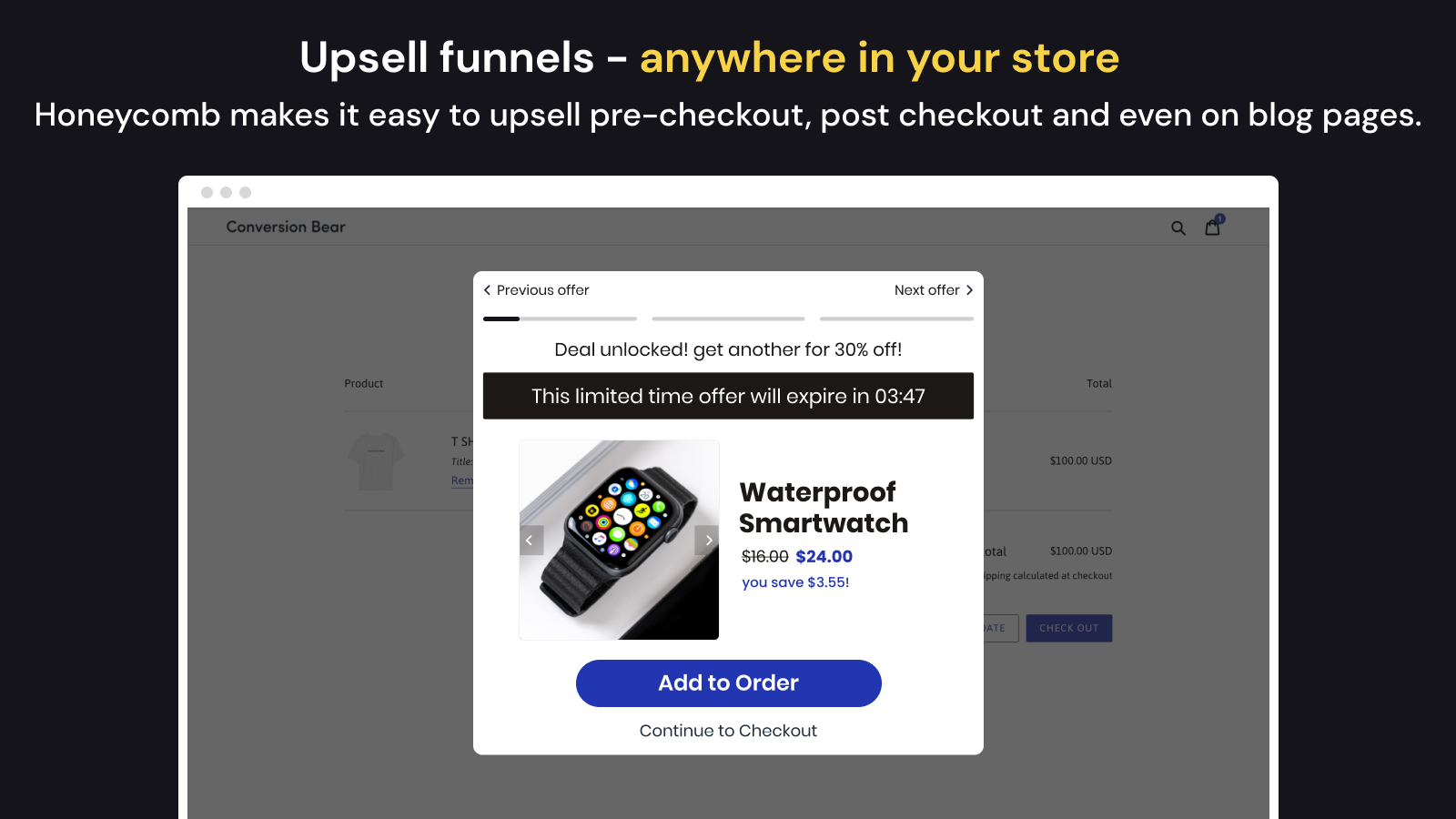
Honeycomb, developed by Conversion Bear, supports offers across product, cart, post-purchase, and thank-you-page placements.
Its split-testing functionality makes it worth evaluating when you want to compare offers or funnel variations. Pricing depends on funnel views, which requires a different forecast from order-based billing.
Key features
Product-page and cart offers.
One-click post-purchase offers.
Thank-you-page offers.
Split testing.
Automated recommendations.
Branding removal on paid tiers.
Pricing
Plan | Monthly price | Monthly funnel views |
|---|---|---|
Free | $0 | 100 |
Silver | $54.99 | 2,000 |
Gold | $109.99 | 5,000 |
Platinum | $169.99 | 10,000 |
Paid plans list a seven-day trial.
Best for: Merchants prioritizing funnels and offer comparisons.
Limitations: Views consume the allowance even without accepted offers. Confirm how repeated views and funnel stages are counted.
15. SellUp: best for contextual accessories and add-ons

SellUp, developed by LAUNCHTIP, helps merchants present accessories, matching items, and other relevant additions.
It is useful to evaluate when the product relationship is straightforward: a compatible case, matching garment, or optional gift wrap. View-based pricing makes offer exposure an important budgeting input.
Key features
Product-page add-ons.
Cart upsells.
Frequently bought together.
Shop-the-look suggestions.
AI on-page recommendations.
Analytics and customization.
Pricing
Plan | Monthly price | Monthly upsell views |
|---|---|---|
Free Tier | Free to install | Up to 500 |
Getting Started | $14.99 | Up to 5,000 |
The listing advertises 0% sales commission; additional plans are available.
Best for: Stores with straightforward accessory relationships.
Limitations: Offer views may grow faster than orders. Its “Post Purchase” label needs checking against your intended mechanism; do not assume every after-checkout offer modifies the original paid order.
Choose the offer before choosing the app
Match the offer to your products
An upsell encourages a higher-value version or quantity. A cross-sell adds a complementary product. Many Shopify upsell and cross-sell apps support both.
Use these hypothetical scenarios to identify your requirements:
Store | Offer | Required capability | Reason to reject a candidate |
|---|---|---|---|
Apparel | Matching belt with trousers | Contextual add-on and variant selection | Cannot exclude unavailable sizes |
Skincare | Customer-built routine | Bundle selection and component stock | Cannot handle the required variants or discounts |
Home goods | Filters with an appliance | Accurate compatibility rules | Recommends incompatible filters |
Consumables | Larger pack instead of one unit | Replacement or upgrade offer | Adds duplicate units instead of the intended pack |
Start with a product relationship you can explain. Automation should present a useful offer, not replace catalogue knowledge.
Match the offer to its placement
Placement | When it appears | Main selection question |
|---|---|---|
Product page | Before the item is added to cart | Does the offer help customers choose products or quantities? |
Cart | Before payment | Can customers review and decline it without friction? |
Checkout steps | During information, shipping, or payment | Is the store on Plus, and does the app plan include access? |
Post-purchase extension | After payment, before the thank-you page | Is the order eligible for an order-modifying offer? |
Thank-you/order-status page | After the purchase confirmation stage | What happens when the customer accepts the recommendation? |
Shopify distinguishes the post-purchase extension from the thank-you page. Checkout-step UI extensions require Plus, while eligible post-purchase extensions are available on Basic or higher.
Check payment and operational eligibility
A post-purchase app cannot necessarily show an offer on every paid order.
Shopify’s documented restrictions include specified wallet and installment payments, some payment providers, orders with duties or multiple currencies, and local-delivery orders. Only one app can be selected for post-purchase extension offers.
Shopify also documents fulfillment holds during the post-purchase flow. Merchants using automated fulfillment should verify that their workflow respects these holds.
Use the current Shopify product-offer documentation and your chosen app’s support guidance to check your actual order mix. These restrictions concern the extension experience, not every cart or thank-you-page recommendation.
Compare what the apps will actually cost
Understand what “free” includes
Free installation, a timed trial, a monthly allowance, development access, and a lifetime allowance are different arrangements.
Before approving a subscription, record:
The required feature and qualifying plan.
The metric used for billing.
The allowance and reset period.
The upgrade or overage rule.
The cost at expected usage.
Any integration or optional-feature charges.
Compare costs under shared assumptions
This table compares selected order-based options after introductory trials and lifetime allowances. It does not price every feature package.
App | 100 orders/month | 500 orders/month | 1,000 orders/month | Scope |
|---|---|---|---|---|
Selleasy | $9 | $9 | $19 | Starter; excludes Pro checkout access |
Frequently Bought Together CBB | $19.99 | $19.99 | $39.99 | Listed paid order tiers |
UpCart | $29.99 | $34.99 | $54.99 | Monthly store-order tiers |
iCart | $9 | $29 | Confirm | Listed order tiers |
Candy Rack | $39.99 | $59.99 | Confirm | Online-store orders |
Figures follow the checked listings. Confirm how each app counts orders and handles boundary values.
Other apps need different inputs:
Billing model | Example | Input needed |
|---|---|---|
Generated revenue | Essential | Attributed revenue and placement |
Bundle sales | Fast Bundle | Monthly bundle-sales value |
Upsell revenue | Zipify | Revenue definition and full tier schedule |
Views | Honeycomb, SellUp | Eligible impressions, not just orders |
Shopify plan | Bold | Basic, Grow, Advanced, or Plus |
Packages plus volume | Rebuy, AfterSell | Features and store-order volume |
Promotion usage | BOGOS | Qualifying plan and counted BOGOS orders |
Two stores with 500 orders can have different bills if one displays offers widely and the other runs a narrowly targeted campaign.
Shortlist and test an app before committing
Filter by requirements first
Compare two candidates using this worksheet:
Requirement | Your specification | Candidate A | Candidate B |
|---|---|---|---|
Offer | Product and customer benefit | Supported? | Supported? |
Placement | Where it should appear | Eligible? | Eligible? |
Integrations | Required systems | Verified? | Verified? |
Cost | Expected usage and budget | Estimated bill | Estimated bill |
Operations | Stock, shipping, refunds | Tested? | Tested? |
Limitations | Unacceptable restrictions | Pass/fail | Pass/fail |
Reject a candidate that fails a must-have requirement before considering optional features.
Run a pre-launch acceptance checklist
Relevance: The product fits the original purchase.
Consent: Customers can decline and proceed easily.
Mobile: Buttons, prices, and variants remain usable.
Inventory: Unavailable combinations are handled correctly.
Discounts: Active promotions produce the expected total.
Payments: Eligible methods show the intended offer.
Order records: Accepted items, taxes, and quantities are correct.
Fulfillment: Holds and added items reach the operational workflow.
Refunds: Staff understand how to reverse the transaction.
Reporting: App totals can be reconciled with orders.
Performance: The experience remains usable after activation.
If one check fails, fix it before expanding the campaign.
Avoid overlapping tools
Review your existing apps and theme functionality before replacing a cart or adding recommendation blocks. If you are considering a theme change, our Shopify theme comparison provides broader selection guidance.
Multiple apps may serve different purposes, but duplicate drawers, discounts, or recommendations can conflict. For post-purchase extension offers, Shopify allows only one selected app.
Shopify also identifies cumulative performance costs from overlapping checkout extensions. Test your actual configuration rather than relying on a badge or “lightweight” claim alone.
Decide whether the app is adding value
Define your measurement before launching
Metric | Suggested definition |
|---|---|
Offer exposure | Eligible displayed offers |
Acceptance | Accepted offers divided by eligible displayed offers |
Conversion | Completed purchases divided by the consistently defined visitor or session population |
Average order value | Order revenue divided by orders, using consistent refund and tax treatment |
Contribution | Added revenue minus relevant variable costs and app costs |
Operational quality | Errors, support issues, refunds, and fulfillment exceptions |
For pre-purchase offers, monitor original-order conversion as well as AOV. For post-purchase offers, calculate exposure from eligible orders rather than assuming every order sees a campaign.
Shopify documents limitations in how some third-party analytics report post-purchase value. Reconcile app reporting with order records rather than assuming dashboards will match automatically.
Calculate contribution after costs
This hypothetical example assumes 80 genuinely additional accessory sales:
Item | Calculation | Amount |
|---|---|---|
Revenue after offer discounts | 80 × $18 | $1,440 |
Product cost | 80 × $7 | −$560 |
Incremental packing and shipping | 80 × $2 | −$160 |
Incremental payment cost | 80 × $0.60 | −$48 |
App fee | Monthly | −$35 |
Contribution after listed costs | $637 |
The discount is already reflected in the $18 price; do not subtract it twice.
This is not total business profit. Returns, support, overhead, and any loss in original-order conversion can affect the result. If customers would have purchased the accessory anyway, all recorded revenue cannot be treated as incremental.
Keep, change, or stop
Keep: The offer works reliably and contributes enough after costs.
Change: Relevance, targeting, price, or visibility needs improvement.
Stop: Persistent friction or poor economics outweigh the benefit.
Where feasible, use a control group. Compare like-for-like products and traffic periods, and avoid declaring success from a handful of accepted offers.
Frequently asked questions
What is the best Shopify upsell app for beginners?
Selleasy is a candidate for affordable recommendations across several placements. Essential is worth comparing for a focused product-page or post-purchase test. Frequently Bought Together CBB and SellUp suit clear accessory relationships.
Choose by the first offer you need, not by the longest feature list.
Which free Shopify upsell apps are useful?
Selleasy, Essential, Frequently Bought Together CBB, Honeycomb, SellUp, and ReConvert advertise free access with different restrictions.
Compare the allowance with expected usage. Fifty orders, three manual bundles, $100 generated revenue, and 100 funnel views are not interchangeable.
Can I upsell without Shopify Plus?
Yes. Product-page and cart offers do not inherently require Plus, and eligible post-purchase extensions are available on Basic or higher.
Checkout-step UI extensions require Plus. The app may also require a higher subscription, as Selleasy does for checkout offers.
Can I use more than one upsell app?
Yes, where the tools have compatible, distinct roles. Check duplicate widgets, discounts, cart ownership, billing, and attribution.
Only one app can be selected for Shopify’s post-purchase extension offers.
Will an upsell app slow down my store?
It can add resources or interactions. The effect depends on the app, placement, theme, and other installed extensions.
Compare mobile and checkout behavior before and after activation, and remove unused or overlapping functionality.
Can I upsell without an app?
Some themes or custom implementations can provide recommendations and add-ons. Check what your current theme supports before paying for duplicate functionality.
A theme recommendation section is not automatically equivalent to an order-modifying post-purchase offer.
When should I postpone installing an app?
Postpone if products lack useful companions, margins cannot support the offer, or checkout and fulfillment have unresolved problems.
Start with a relevant offer and a measurable objective. Shortlist two compatible shopify apps, verify the applicable plan and total cost, and trial one campaign before expanding.
Written by
Pluginos
Pluginos is a WordPress, WooCommerce, and Shopify development team with 8+ years of experience building plugins, apps, and eCommerce solutions. We share practical tutorials and insights based on hands-on development experience.
Related articles
Shopify Login to See Price: How to Hide Prices and Add to Cart (2026)
Learn how to hide Shopify prices and Add to Cart until customers log in. Follow app and Liquid code methods, set wholesale approval rules, and test your storefront.
Oct 8, 2026 · 10 min read
6 Methods to Hide Out-of-Stock Variants in Shopify
Learn six ways to hide out-of-stock variants in Shopify without deleting them. Compare native controls, theme customizations, and automatic hiding with the HV Hide Out of Stock Variants app.
Oct 7, 2026 · 20 min read
How to Hide Sold-Out Variants in Shopify With Pluginos
Learn how to hide sold-out variants in Shopify with HV Hide Out of Stock Variants by Pluginos. Set visibility rules and automatically restore variants after restocking.
Sep 30, 2026 · 6 min read