
How to Set Minimum & Maximum Order Quantities in Shopify
Learn how to set minimum and maximum order quantities in Shopify native limits, B2B rules, and app-based control by product, customer, and country.

Sep 25, 2026 · 7 min read
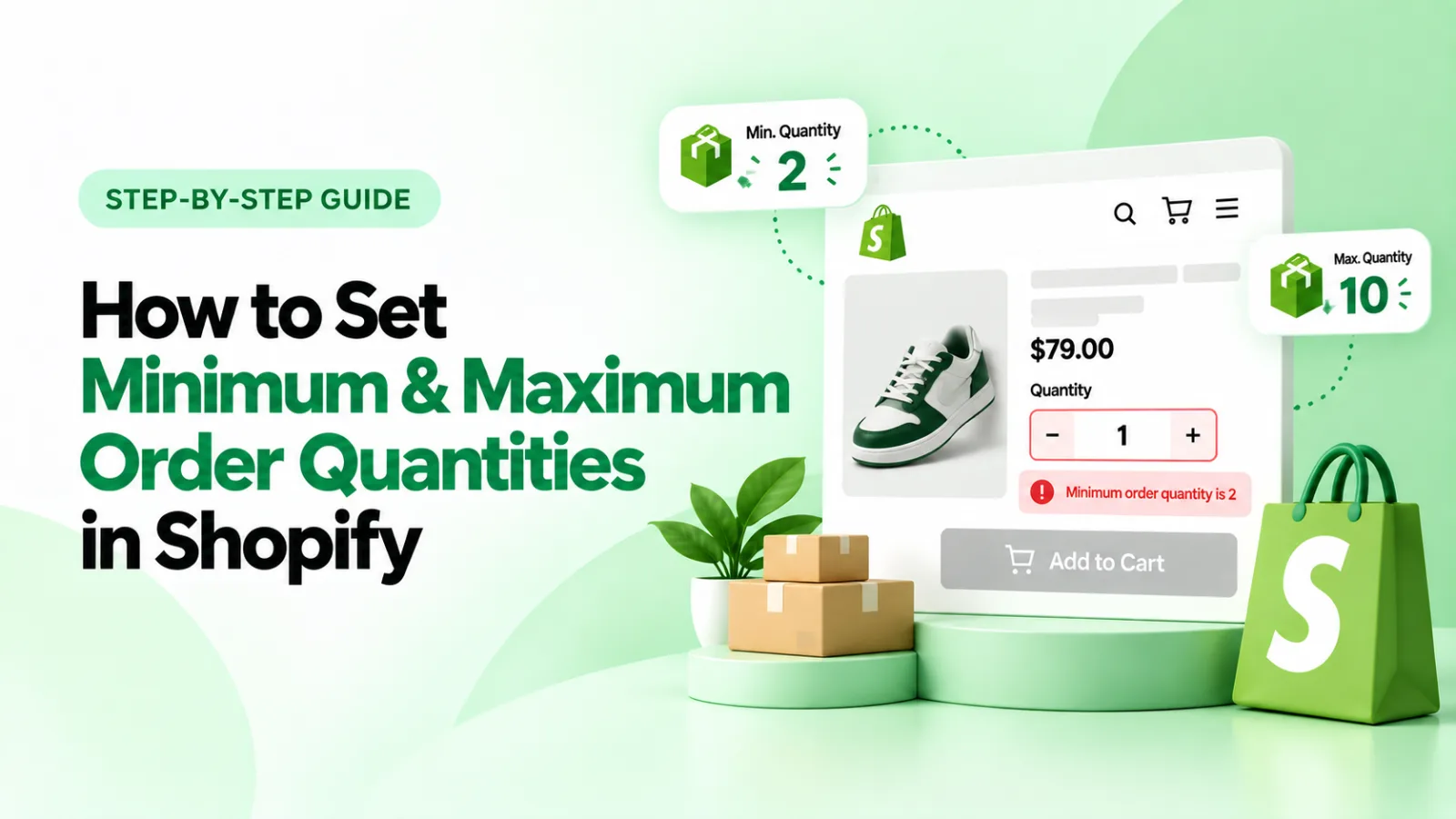
If you sell wholesale, bulk, or limited-edition products, you've probably run into the same problem: customers ordering too few units to be profitable, or too many units to be fair to other shoppers or placing orders too small or too heavy to ship economically. Shopify gives you several ways to solve this: some built in, some through B2B settings, and some through dedicated apps like Order Quantity Limits By Pluginos
This guide covers what Shopify can do natively, what's B2B-only, and when you need an app, including limits based on quantity, order value, and weight.
What Is a Minimum and Maximum Order Quantity in Shopify?
Minimum order quantity (MOQ): the smallest number of units a customer must buy in one order. e.g., “buy at least 12.”
Maximum order quantity: the largest number of units a customer can buy in one order. e.g., “no more than 2 per customer.”
Quantity increment: forces orders in multiples of a set number. e.g., orders must be in packs of 10 (10, 20, 30…), never odd amounts like 15.
Order value limit: a minimum or maximum dollar amount per order, independent of unit count.
Order weight limit: a minimum or maximum total cart weight, often tied to shipping constraints.
Why Set Minimum or Maximum Order Quantities in Shopify?
Wholesale and B2B enforce case packs or minimum order values
Bulk/case-pack products sell in the unit size you actually stock
Limited-edition or drop products stop one buyer from cleaning out inventory
Reseller prevention keep scalpers from bulk-buying discounted stock
Inventory and margin control avoid unprofitable one-unit orders on low-margin items
Shipping and fulfillment control cap total weight so orders fit standard parcel rates
Fraud/risk reduction cap maximum order value on high-ticket items
Promotions cap quantity on doorbuster or flash-sale items
Does Shopify Have a Built-In Quantity Limit?
Yes and this is where a lot of older articles get outdated. Shopify has a native add-to-cart limit setting that caps the maximum quantity of a product a customer can add, found under Settings → Checkout → Add-to-cart limit. This limit applies per variant, independently so a max of 30 would allow 30 red shirts and 30 blue shirts, since they're separate variants.
Separately, Shopify's B2B quantity rules (available on Shopify Plus B2B catalogs) let you configure minimum quantity, maximum quantity, and increment quantity per product or variant for wholesale buyers.
Neither of these covers order value or weight limits; those are exclusively app-level features.
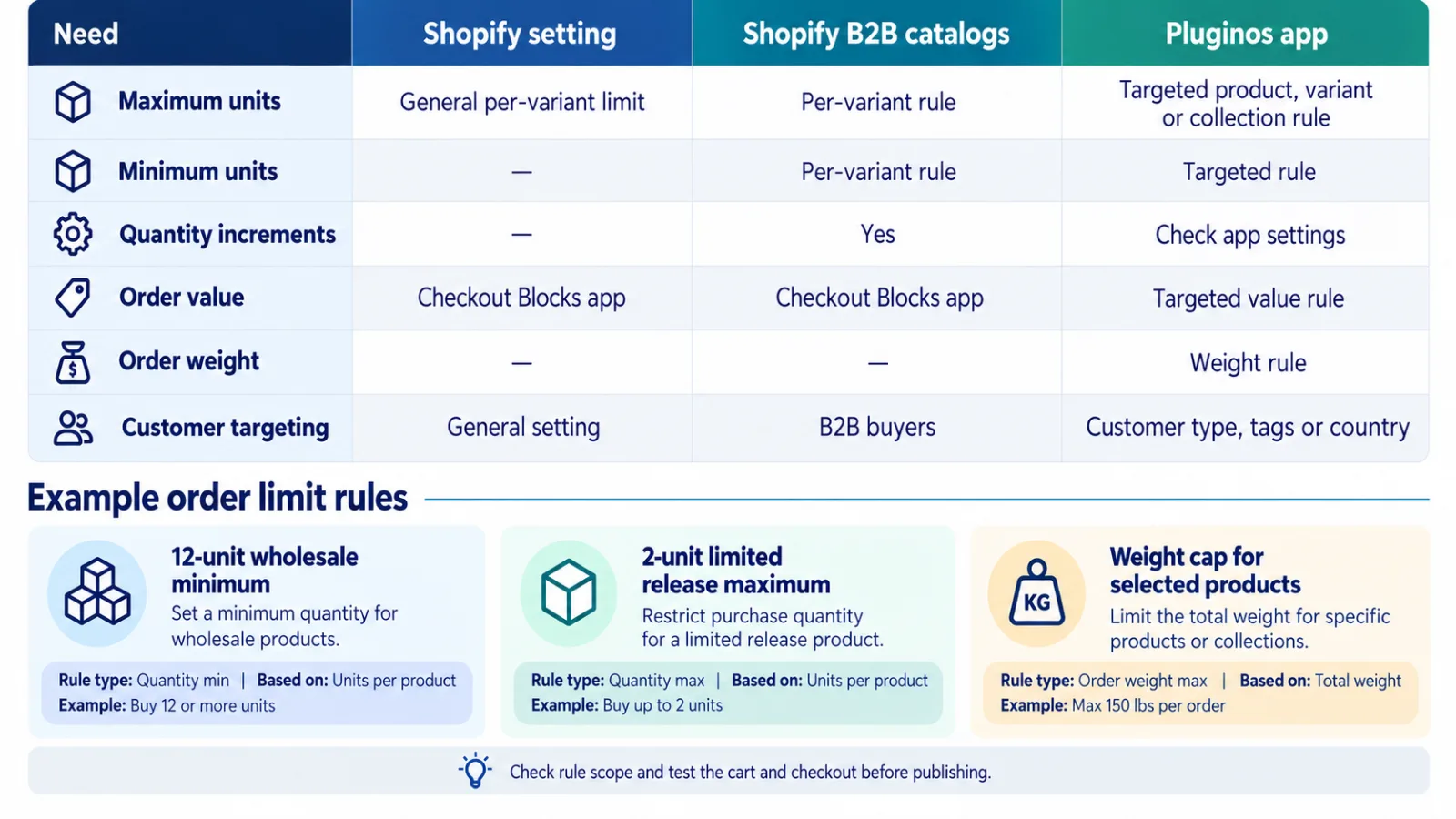
Note:if you're a regular DTC store (not on B2B catalogs) and you need a minimum order quantity, order-value or weight-based rules, custom messaging, or targeting by customer tag or country, Shopify's native settings
How to Set a Maximum Quantity Limit in Shopify (Native)
1. Go to Settings → Checkout
2. Scroll to Cart → Add-to-cart limit
3. Enter the maximum quantity per variant
4. Save
This is store-wide and applies to every product the same way — it can't be customized per product, per collection, or per customer segment, and it can't be based on value or weight.
How to Set Minimum Quantity Rules in Shopify (B2B)
If you're on Shopify Plus with B2B catalogs, minimum, maximum, and increment rules are configured per catalog under Settings → B2B → [Catalog] → Quantity rules and volume pricing. This only applies to companies/customers assigned to that B2B catalog — it doesn't affect your regular storefront, and it doesn't support value or weight-based rules either.
Limiting Orders by Value and Weight, Not Just Quantity
Quantity isn't the only lever. Two other dimensions matter for a lot of stores:
Order value limits
Minimum order value. e.g., wholesale accounts must spend at least $500 per order
Maximum order value. e.g., cap a single order at $2,000 to reduce fraud or fulfillment risk on high-ticket items
Order weight limits
Minimum weight useful for freight-sensitive categories where small orders aren't worth shipping
Maximum weight cap total cart weight to stay within a carrier's per-package limit or a flat-rate shipping tier
If you also sell products priced by size or weight (fabric, resin, bulk goods), see our guide on how to sell by size, area, or weight on Shopify for the pricing side of that setup.
Example: A furniture store caps orders at 150 lbs total cart weight so nothing exceeds standard parcel shipping, while a wholesale skincare brand requires a $300 minimum order value per B2B account.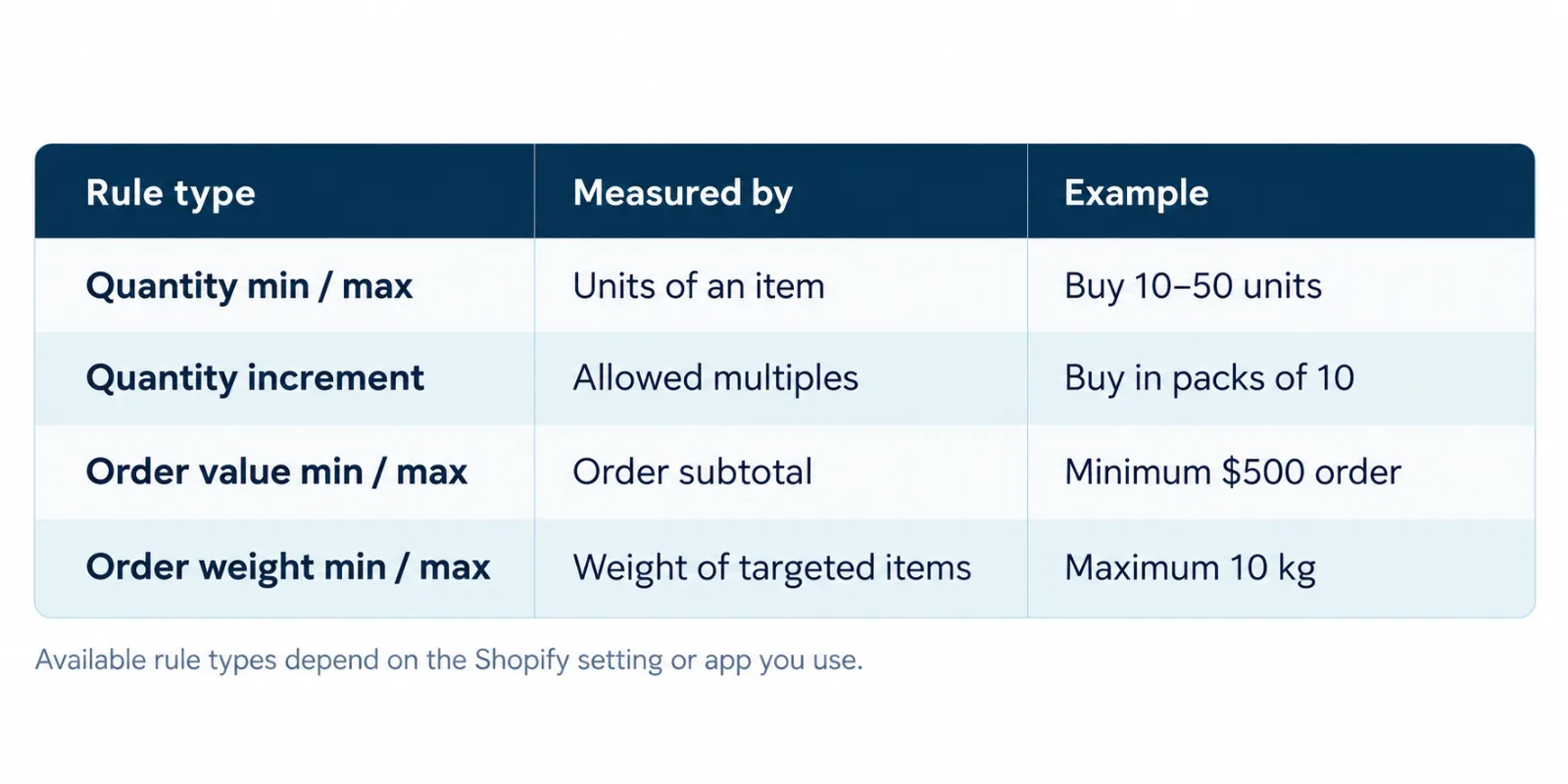
How to Add Quantity, Value, or Weight Rules in Shopify (Any Store)
For stores that aren't on B2B, or that want more granular control — per product, per collection, per variant, by customer tag, by country, or by order value/weight a dedicated app is the practical route.
For a broader view of which app categories are worth installing at all, see our guide to the best Shopify apps to increase sales in 2026.
Setting Min & Max Quantity Limits with Pluginos‑Order Quantity Limits
Pluginos‑Order Quantity Limits is a Shopify app built for quantity-based control. Based on its current App Store listing, it lets you:
Set minimum and/or maximum order quantities per order
Apply rules to specific products, variants, or entire collections
Target specific customer groups (e.g., wholesale, VIP tags), useful if you're not on B2B but still want segment-based rules
Restrict rules globally or to selected countries; pairs well with broader storefront rules. See our guide on how to restrict products by country on Shopify if you also need to hide products or adjust pricing by region, not just cap quantity.
Show a clear error message or popup when a customer tries to order too few or too many units
Setup flow:
1. Install the app from the Shopify App Store
2. Create a new quantity rule
3. Choose the product, variant, or collection it applies to
4. Set your minimum and/or maximum quantity
5. Optionally restrict the rule to a customer tag or country
6. Customize the message shown to shoppers who hit the limit
7. Save and test it on the product page and in cart
Worth knowing: Pluginos currently focuses on quantity-based rules rather than order-value or weight-based limits — a few competitors bundle all three into one app. If your store's main pain point is unit-based control (case packs, per-customer caps, country restrictions), Pluginos is a free, simple, purpose-built option. If you specifically need value- or weight-based cart rules, check whether that's on the roadmap or compare against apps that already support it. It's also a newly listed app (launched May 2026) without a review history yet.
Common Use Cases
Wholesale stores enforce case-pack minimums or minimum order values without needing full B2B catalogs
Limited drops cap purchases per customer so more people get a chance
Bulk/case-pack products sell candles, supplements, or produce in fixed pack sizes
Reseller prevention: stop bulk buyers from draining discounted stock
Freight-sensitive categories cap total order weight to control shipping cost
Seasonal or promotional SKUs apply temporary limits during a sale window
Shopify Quantity Limit FAQ
Can I set a minimum order quantity in Shopify?
Not natively for regular (non-B2B) stores. Shopify's built-in setting only controls maximum quantity. Minimum quantities require either B2B catalogs (Plus only) or an app.
Can I set a maximum order quantity in Shopify?
Yes, natively, via Settings → Checkout → Add-to-cart limit, or with an app if you want the limit to vary by product, collection, or customer segment rather than apply store-wide.
Can I set a minimum or maximum order value in Shopify?
Not natively. Order value limits require a dedicated app that supports value-based rules.
Can I limit orders by weight in Shopify?
Not through Shopify's native settings or B2B quantity rules — weight-based limits are an app-only feature, and not every app supports it, so check the feature list before installing.
Can Shopify limit how many products a customer can buy?
Yes — either through the native add-to-cart limit (store-wide, per variant) or through an app that can target specific customers, tags, or countries.
Can I set different quantity limits for different products or collections?
Not with Shopify's native setting, which is uniform store-wide. Apps like Pluginos‑Order Quantity Limits let you set different rules per product, variant, or collection.
Can I set quantity limits for specific customer groups without B2B?
Yes, if you use an app that supports customer-tag targeting.
Conclusion
Shopify covers the basics a store-wide maximum via checkout settings, and full min/max/increment rules if you're running B2B catalogs. Value and weight-based limits sit entirely outside Shopify's native and B2B tools, so any store needing those has to use an app regardless of plan. Most stores fall somewhere in between: they need minimums, per-product flexibility, or customer/country targeting without being on Shopify Plus B2B. For quantity-based control specifically, Pluginos Order Quantity Limits is a focused option worth trying.
Written by
Pluginos
Pluginos is a WordPress, WooCommerce, and Shopify development team with 8+ years of experience building plugins, apps, and eCommerce solutions. We share practical tutorials and insights based on hands-on development experience.
Related articles
Best Shopify Apps for Small Clothing Stores in 2026
A practical guide to sizing, virtual try-on, returns, reviews, social selling, inventory, bundles, retention and specialist pricing tools.
Sep 23, 2026 · 16 min read
Best Pay What You Want Shopify App
Looking for the best Pay What You Want Shopify app? Discover how Pluginos helps merchants offer customer-selected pricing, Name Your Price, preset amounts, pricing limits, contributions, and flexible pricing while maintaining control over how much customers can pay.
Sep 23, 2026 · 12 min read
How to Restrict Products by Country on Shopify
Learn how to restrict Shopify products by country using Markets and storefront rules. Find out when to hide a product, price, or Add to Cart button, and what to test before customers shop.
Sep 22, 2026 · 6 min read